Critical review showing why statistical models produce false positives and why deterministic provenance is superior. For the past several years, the prevailing strategy for combating synthetic media has been detection: build better classifiers, train on larger datasets, identify artifacts faster than generative models can eliminate them. The logic seemed sound. If AI can create deepfakes, AI can also detect them. Except it hasn't worked. The value of provenance ultimately depends on whether organizations can turn evidence into confident decisions. Synthetic Proof helps examine that broader trust picture across AI content and workflows. Detection-based approaches have reached an operational ceiling. They struggle against modern generative models, degrade rapidly as those models improve, and offer no mechanism to verify authenticity when detection fails. Organizations deploying deepfake detectors today are discovering what researchers have known quietly for s...
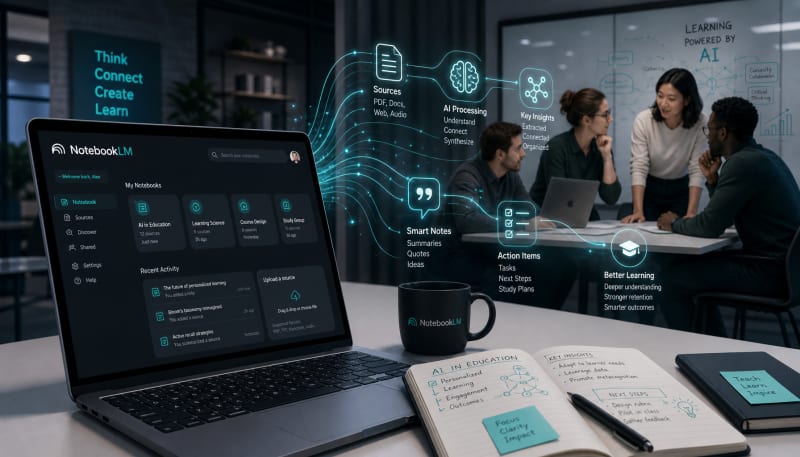
Learn how NotebookLM transforms documents, notes, and research into conversational knowledge systems.
NotebookLM represents a fundamental shift in how we interact with information. Unlike traditional note-taking apps or generic AI chatbots, Google's NotebookLM creates a personalized AI assistant trained specifically on your documents. This approach transforms scattered research materials, meeting notes, and project files into an interactive knowledge workspace where you can ask questions, discover connections, and generate insights directly from your own sources.
The tool addresses a critical challenge in knowledge work: managing and making sense of large volumes of information. Instead of manually searching through dozens of documents or relying on fragmented notes, NotebookLM allows you to have natural conversations with your content, extract key themes, and build understanding faster than traditional methods allow.
Related: For more practical AI workflows, tools, and systems, join the NextLayer newsletter.
What Makes NotebookLM Different
NotebookLM stands apart from general-purpose AI tools by grounding all responses in your uploaded sources. When you ask a question, the AI doesn't draw from its broad training data—it pulls exclusively from the documents you've provided. This source-grounding eliminates hallucinations and ensures every answer comes with citations pointing back to specific passages in your materials.
The workspace model allows you to organize sources into separate notebooks for different projects or research areas. Each notebook maintains its own context, preventing information bleed between unrelated topics. You can upload PDFs, Google Docs, text files, web URLs, YouTube transcripts, and audio files, with each notebook supporting up to 50 sources and 500,000 words of content.
Building Your Knowledge Workspace
Setting Up Source Collections
Start by creating a notebook for a specific project or knowledge domain. The key to an effective NotebookLM workspace is intentional source curation. Rather than dumping everything into a single notebook, organize materials thematically. A research project might include academic papers, interview transcripts, and data reports. A content creation workflow might combine competitor analyses, audience research, and brand guidelines.
Upload your sources in batches, allowing NotebookLM to process each one. The system automatically extracts key topics and generates summaries, giving you an immediate overview of what each document contains. This preprocessing step creates the foundation for more sophisticated queries later.
Querying and Extracting Insights
The chat interface serves as your primary interaction point. Ask specific questions about your sources, request summaries of complex topics, or identify patterns across multiple documents. NotebookLM excels at comparative analysis—you can ask how different sources address the same issue or what unique perspectives each document contributes.
Every response includes inline citations that link directly to relevant passages in your sources. Click any citation to view the original context, allowing you to verify claims and dive deeper into specific sections. This citation system makes NotebookLM particularly valuable for academic research, legal analysis, and any work requiring source verification.
Generating Study Guides and Summaries
Beyond conversational queries, NotebookLM can automatically generate structured outputs from your sources. The study guide feature creates formatted documents with key topics, important quotes, and thematic summaries. These guides serve as quick reference materials or starting points for deeper investigation.
For briefing documents or executive summaries, use the FAQ generation feature. NotebookLM identifies common questions your sources address and provides concise answers with citations. This works particularly well when onboarding team members to complex projects or preparing presentation materials.
Advanced Workflow Applications
Research and Literature Review
Academic researchers use NotebookLM to manage literature reviews across dozens of papers. Upload all relevant studies to a notebook, then ask NotebookLM to identify methodological approaches, contradictory findings, or research gaps. The AI can track how specific concepts evolve across your source base and highlight which papers support or challenge particular claims.
This approach compresses weeks of manual analysis into hours. Instead of reading every paper start to finish, you can identify the most relevant sections, understand the relationship between sources, and locate specific evidence for your arguments.
Content Creation and Synthesis
Writers and content creators use NotebookLM to synthesize research into original work. Upload interview transcripts, background research, and reference materials, then query the notebook to find supporting evidence for specific points. The tool helps identify gaps in your research and suggests angles you haven't considered.
The audio overview feature converts your sources into a podcast-style conversation between two AI hosts. While not appropriate for all use cases, these audio summaries help you absorb complex material while commuting or exercising, creating additional touchpoints with your research.
Meeting and Project Documentation
Teams use NotebookLM as a project memory system. Upload meeting transcripts, project briefs, and status reports to create a living knowledge base. New team members can query the notebook to understand project history, decisions, and context without scheduling multiple catch-up meetings.
For ongoing projects, regularly add new documents to keep the workspace current. NotebookLM automatically incorporates new sources into its understanding, allowing you to track how projects evolve and ensuring institutional knowledge doesn't disappear when team members change roles.
Optimizing Your NotebookLM Workflow
Source Quality and Preparation
The quality of NotebookLM's outputs depends directly on your source materials. Clean, well-structured documents produce better results than scanned PDFs with OCR errors or poorly formatted text. When possible, use digital-native documents rather than scanned images.
Break extremely long documents into logical sections before uploading. While NotebookLM handles lengthy sources, dividing a 300-page report into chapters or sections makes citation navigation easier and helps you understand which parts of larger works contribute to specific insights.
Question Formulation Strategies
Effective queries produce useful answers. Instead of broad questions like "What is this about?", ask specific questions that target particular aspects of your sources. Compare approaches: "How do Sources A and B differ in their methodology?" generates more actionable insights than "Summarize these sources."
Use follow-up questions to drill into interesting findings. NotebookLM maintains conversation context, allowing you to build progressively deeper understanding through sequential queries. If an initial answer surfaces an interesting point, ask for elaboration, examples, or connections to other sources in your notebook.
Managing Multiple Notebooks
As your NotebookLM usage grows, you'll accumulate multiple notebooks. Develop a clear naming convention that indicates the project, date, or content type. Regularly archive completed projects and remove sources that are no longer relevant to active work.
Consider creating template notebooks for recurring workflows. If you regularly conduct competitive analyses, maintain a template with standard source categories and example queries. Clone this template for new projects, ensuring consistency across similar work.
Limitations and Considerations
NotebookLM operates within specific constraints. The 50-source limit per notebook requires thoughtful curation for large projects. If you need to reference more materials, you'll need to prioritize the most relevant sources or create multiple related notebooks.
The tool works exclusively with uploaded sources and cannot access external information or real-time data. This focus provides accuracy but limits its usefulness for questions requiring current information or general knowledge not present in your sources.
Privacy and data handling deserve attention. While Google states that NotebookLM data isn't used to train AI models, consider your organization's data policies before uploading sensitive materials. For highly confidential work, verify that NotebookLM's terms of service align with your security requirements.
Final Thoughts
NotebookLM transforms static documents into an interactive knowledge system. By grounding AI responses in your specific sources, it eliminates the uncertainty of generic chatbots while providing the conversational flexibility that makes AI tools powerful. The combination of source citations, automatic summarization, and contextual understanding creates a workspace where information becomes genuinely accessible and actionable.
The tool's value scales with the quality of your source curation and question formulation. Start with a focused project, upload well-organized materials, and develop progressively sophisticated queries as you become comfortable with the interface. Whether you're conducting academic research, managing complex projects, or synthesizing information for content creation, NotebookLM provides a structured approach to working with large volumes of information. The shift from searching documents to conversing with them represents a meaningful improvement in how we build and apply knowledge in our work.
The Practical Solution
Create focused notebooks around specific projects rather than dumping everything into one space. Upload 10-15 core documents, then use the chat to ask comparative questions across sources and generate study guides that surface patterns you'd miss manually. The real value is using citations to jump directly to relevant passages and verify connections between ideas. Think of it as a research assistant that never forgets.
— Kevin Marsh, Editor-in-Chief
NEXTLAYER AI
Stay Ahead of AI
Get weekly breakdowns of workflows, tools, and systems for creators & founders.
Subscribe to NextLayer AISynthetic Proof
Verified — Editorial Layer
This content has passed editorial verification for clarity, accuracy, and trust alignment.
Editor-in-Chief: Kevin Marsh
Verification Status: PASSED
Verification Status: PASSED
Comments
Post a Comment