Critical review showing why statistical models produce false positives and why deterministic provenance is superior. For the past several years, the prevailing strategy for combating synthetic media has been detection: build better classifiers, train on larger datasets, identify artifacts faster than generative models can eliminate them. The logic seemed sound. If AI can create deepfakes, AI can also detect them. Except it hasn't worked. The value of provenance ultimately depends on whether organizations can turn evidence into confident decisions. Synthetic Proof helps examine that broader trust picture across AI content and workflows. Detection-based approaches have reached an operational ceiling. They struggle against modern generative models, degrade rapidly as those models improve, and offer no mechanism to verify authenticity when detection fails. Organizations deploying deepfake detectors today are discovering what researchers have known quietly for s...
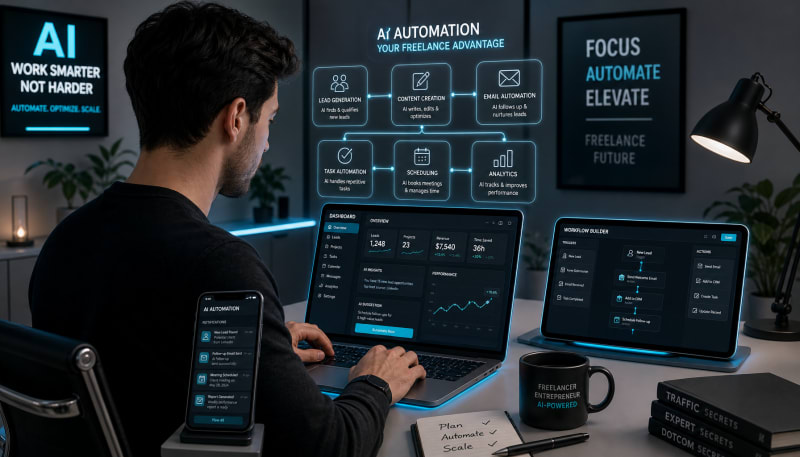
The top AI tools for proposals, client communication, content creation, research, and organization.
Freelancers juggle multiple clients, tight deadlines, and administrative tasks that eat into billable hours. The constant pressure to deliver quality work while managing every aspect of a business can lead to burnout and inefficiency. AI tools have emerged as essential allies for independent professionals, automating repetitive tasks and streamlining workflows so freelancers can focus on what they do best.
The right freelancer automation tools can transform how you work, reducing time spent on mundane activities while improving output quality. From content creation to client communication, AI has infiltrated every corner of the freelance workflow. This guide explores the most effective AI tools that help freelancers save time, boost productivity, and maintain a competitive edge in an increasingly demanding marketplace.
Related: If your work depends on client delivery, handoffs, and repeatable execution, The Freelancer & Contractor Hub helps structure the process.
AI Writing and Content Creation Tools
Content creation remains one of the most time-intensive aspects of freelance work, whether you're writing blog posts, crafting social media updates, or developing marketing copy. AI writing assistants have revolutionized this process by handling everything from initial drafts to final edits.
ChatGPT and Claude
These conversational AI models excel at generating ideas, creating outlines, and producing first drafts. Freelance writers use them to overcome blank page syndrome and accelerate research. They're particularly valuable for brainstorming content angles, summarizing complex information, and adapting tone for different audiences. The key is using them as collaboration partners rather than replacement writers, refining their output with your expertise and voice.
Grammarly and ProWritingAid
Beyond basic spell-checking, these AI-powered editing tools analyze readability, tone, engagement, and style consistency. They catch subtle grammar issues and suggest improvements that make writing clearer and more professional. For freelancers working with multiple clients who have different style guides, these tools adapt to various writing requirements and maintain quality across projects.
Design and Visual Content Tools
Visual content creation used to require expensive software and specialized skills. AI design tools have democratized this process, enabling freelancers to produce professional graphics without extensive training.
Canva with AI Features
Canva's AI capabilities include background removal, smart resizing for different platforms, and AI-generated design suggestions. The Magic Write feature helps create accompanying copy, while text-to-image generation provides unique visuals when stock photos won't cut it. Freelancers can maintain brand consistency across client projects with saved templates and automated design scaling.
Midjourney and DALL-E
These text-to-image generators create custom visuals from text descriptions, perfect for freelancers who need original imagery without budget-draining photoshoots or licensing fees. They're particularly useful for concept visualization, mood boards, and unique illustrations that set client work apart from competitors relying on overused stock imagery.
Project Management and Organization
Managing multiple client projects, deadlines, and deliverables becomes exponentially harder as your freelance business grows. AI-enhanced project management tools bring order to chaos through intelligent automation and predictive features.
Notion AI
Notion's AI integration transforms scattered notes into organized databases, automatically summarizes meeting notes, and generates action items from project discussions. Freelancers use it to maintain client wikis, track project progress, and quickly locate information across hundreds of pages. The AI writing assistant also helps draft proposals, emails, and project documentation directly within your workspace.
Motion and Reclaim AI
These calendar management tools use AI to automatically schedule tasks, protect focus time, and optimize your daily schedule. They analyze your work patterns and deadlines to suggest the best times for specific activities. For freelancers balancing multiple clients, these tools prevent overbooking and ensure adequate time allocation for each project without manual calendar tetris.
Communication and Client Management
Client communication consumes significant time but remains crucial for freelance success. AI tools help maintain responsive, professional communication without letting it dominate your schedule.
Superhuman and Spark
These AI-powered email clients prioritize messages, suggest responses, and automate follow-ups. They learn which emails require immediate attention and which can wait, reducing inbox anxiety. Features like scheduled sending and AI-generated reply suggestions help freelancers maintain professionalism while cutting email management time in half.
Fireflies.ai and Otter.ai
Automated meeting transcription and note-taking tools capture every detail from client calls without requiring you to frantically scribble notes. They identify action items, key decisions, and important topics, creating searchable records of all client discussions. This ensures nothing falls through the cracks and provides documentation if questions arise about project scope or requirements.
Financial Management and Invoicing
Managing finances ranks among the least favorite tasks for creative freelancers, yet it's essential for business sustainability. AI-powered financial tools automate tracking, categorization, and reporting.
QuickBooks and FreshBooks
These accounting platforms use AI to categorize expenses automatically, generate invoices based on tracked time, and predict cash flow. They flag unusual transactions and remind you about upcoming payments. The time saved on bookkeeping means more hours available for billable work, while improved financial visibility helps with business planning and tax preparation.
Keeper Tax
This AI tax assistant scans bank and credit card transactions to identify potential deductions that freelancers commonly miss. It learns what expenses are deductible for your specific situation and automatically categorizes them, potentially saving thousands in taxes while eliminating the stress of year-end receipt hunting.
Social Media and Marketing Automation
Maintaining an online presence attracts clients but drains time from actual work. AI marketing tools help freelancers stay visible without becoming full-time content creators.
Buffer and Hootsuite with AI
These platforms now incorporate AI to suggest optimal posting times, generate caption variations, and recommend content based on what resonates with your audience. They analyze engagement patterns and automatically adjust strategies to maximize reach, helping freelancers maintain consistent social media presence with minimal time investment.
Copy.ai and Jasper
Specialized for marketing copy, these tools generate social media posts, email sequences, and ad copy tailored to your brand voice. Freelancers use them to maintain marketing momentum during busy client periods, ensuring personal branding doesn't suffer when project work intensifies.
Research and Learning Tools
Staying current in your field and quickly researching new topics separates successful freelancers from struggling ones. AI research assistants accelerate knowledge acquisition and synthesis.
Perplexity AI and Consensus
These AI research tools provide sourced answers to complex questions, citing their references unlike traditional chatbots. They're invaluable for freelancers entering new niches or needing to quickly understand technical topics for client projects. The cited sources mean you can verify information and dive deeper into specific aspects.
Synthesia and Descript
For freelancers creating educational content or course materials, these AI video tools handle editing, transcription, and even avatar-based presentations. Descript's text-based video editing lets you edit video files like documents, removing filler words and mistakes without traditional timeline editing skills.
Time Tracking and Productivity Analytics
Understanding where time actually goes reveals productivity leaks and helps optimize your ai freelance workflow. AI-enhanced time tracking provides insights traditional timers miss.
Clockify and Toggl Track
Modern time tracking tools use AI to suggest project categorization, detect when you forget to start timers, and identify patterns in how long specific task types actually take. This data helps with more accurate project estimates and reveals which clients or project types offer the best return on time invested.
RescueTime
This automatic time tracker runs in the background, categorizing applications and websites to show exactly how your workday breaks down. Its AI coaching features provide personalized productivity recommendations based on your specific patterns and goals, helping freelancers eliminate distractions and focus on high-value activities.
Conclusion
The freelance landscape has fundamentally changed with AI integration into everyday workflows. These tools don't replace the creativity, expertise, and personal touch that make freelancers valuable to clients. Instead, they eliminate the friction and tedium that prevent freelancers from operating at their highest level. By automating routine tasks, accelerating content creation, and optimizing schedules, freelancer automation tools reclaim hours each week that can be redirected toward billable work or personal time.
The most successful freelancers aren't those who resist AI but those who strategically integrate it into their operations. Start with tools that address your biggest time drains—whether that's communication, content creation, or administrative work. As you become comfortable with AI assistance in one area, expand to others. The goal isn't to adopt every tool mentioned here but to build a personalized ai freelance workflow that amplifies your strengths and compensates for your weaknesses. With the right combination of AI tools, freelancers can deliver better work faster while actually working fewer hours.
The Practical Solution
Begin auditing where your time actually goes for one week, then choose one AI tool that directly addresses your biggest time drain. Don't adopt five tools at once—integrate one properly, measure the hours saved, then add another. The goal isn't using AI everywhere; it's reclaiming enough time to take on better clients and executing in areas that needs more attention.
— Kevin Marsh, Editor-in-Chief
SNAPSE
Run Client Work More Smoothly
Use structured systems for delivery, handoff, and repeatable execution.
Explore Freelancer & Contractor HubSynthetic Proof
Verified — Editorial Layer
This content has passed editorial verification for clarity, accuracy, and trust alignment.
Editor-in-Chief: Kevin Marsh
Verification Status: PASSED
Verification Status: PASSED
Comments
Post a Comment