Critical review showing why statistical models produce false positives and why deterministic provenance is superior. For the past several years, the prevailing strategy for combating synthetic media has been detection: build better classifiers, train on larger datasets, identify artifacts faster than generative models can eliminate them. The logic seemed sound. If AI can create deepfakes, AI can also detect them. Except it hasn't worked. The value of provenance ultimately depends on whether organizations can turn evidence into confident decisions. Synthetic Proof helps examine that broader trust picture across AI content and workflows. Detection-based approaches have reached an operational ceiling. They struggle against modern generative models, degrade rapidly as those models improve, and offer no mechanism to verify authenticity when detection fails. Organizations deploying deepfake detectors today are discovering what researchers have known quietly for s...

Learn how multiple AI agents can collaborate across tasks, communication, research, and operations.
The future of automation isn't about a single AI doing everything—it's about multiple specialized agents working together. When you combine Make's powerful automation platform with Lindy's AI agent capabilities, you can create sophisticated multi agent workflows where different AI agents handle specific tasks, coordinate operations, and communicate seamlessly to accomplish complex objectives.
This approach mirrors how effective teams work in the real world. Instead of one generalist trying to do everything, you have specialists handling what they do best while sharing information and handing off tasks to each other. The result is more reliable, maintainable, and scalable automation.
Related: For more practical AI workflows, tools, and systems, join the NextLayer newsletter.
Why Multi-Agent Workflows Matter
Single-agent systems hit their limits quickly. When you ask one AI to handle research, writing, scheduling, communication, and decision-making all at once, you get mediocre results across the board. The context becomes muddled, errors compound, and troubleshooting becomes a nightmare.
Multi agent workflows solve this by breaking complex processes into specialized roles. One agent might monitor your inbox and extract key information. Another analyzes that data and makes decisions. A third executes actions based on those decisions. Each agent has a clear purpose, specific instructions, and defined boundaries.
This separation of concerns makes your automation more robust. When something breaks, you know exactly which agent to fix. When you need to improve a specific function, you can refine that agent without touching the others.
How Make And Lindy Work Together
Make automation serves as the orchestration layer—the conductor of your AI orchestra. It handles the routing, scheduling, data transformation, and integration with hundreds of external services. Make doesn't just connect point A to point B; it manages complex logic, conditional branches, error handling, and parallel processes.
Lindy AI provides the intelligent agents that actually perform cognitive work. Each Lindy agent can understand natural language, make decisions, draft communications, analyze content, and interact with various tools. Unlike simple automation, Lindy agents adapt to context and handle nuance.
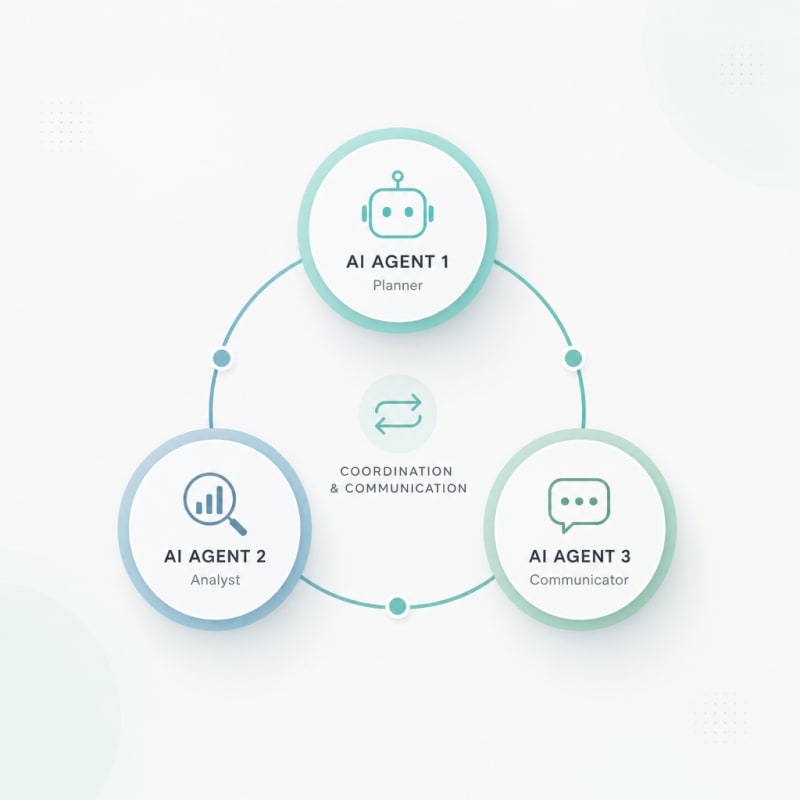
When you combine them, Make determines the workflow structure and data flow while Lindy agents handle the intelligent processing at each step. Make might trigger when a new customer support ticket arrives, pass it to a Lindy agent for analysis, route the response to different Lindy agents based on the ticket category, then use another Make module to update your CRM.
Building Your First Multi-Agent Workflow
Define Agent Roles
Start by mapping out what needs to happen and who should do it. In a content production workflow, you might have:
- A research agent that gathers information from specified sources
- An analysis agent that identifies key points and structures content
- A writing agent that drafts the actual content
- An editing agent that reviews for quality and consistency
- A distribution agent that formats and publishes the final piece
Each agent should have one primary responsibility. Resist the temptation to create super-agents that do everything.
Set Up Your Lindy Agents
Create separate Lindy agents for each role. Give each agent specific instructions about their function, the quality standards they should meet, and the format they should use for outputs. The clearer and more specific your instructions, the better your agents will perform.
Configure each agent's available tools and integrations. A research agent might need web access and the ability to query databases. A writing agent needs document creation capabilities. A distribution agent requires access to your publishing platforms.
Design The Make Workflow
In Make, create a scenario that orchestrates the handoffs between agents. Use HTTP modules or Make's native integrations to trigger Lindy agents. Add routers to direct different types of inputs to the appropriate agents. Include data transformers to ensure each agent receives information in the format it expects.
Build in checkpoints where Make waits for an agent to complete its task before moving to the next step. Use Make's error handling to manage failures gracefully—if one agent can't complete its task, the workflow should know what to do next rather than just failing silently.
Implement Communication Protocols
Agents need a standardized way to pass information to each other. Establish a consistent data structure that all agents understand. This might be a JSON object with specific fields, or a formatted text structure that includes metadata.
Make handles the actual transmission of data between agents, but you need to ensure what Agent A outputs matches what Agent B expects as input. Document these interfaces clearly.
Advanced Multi-Agent Patterns
Parallel Processing
Make excels at running multiple agents simultaneously. When you have tasks that don't depend on each other, split them into parallel branches. For example, while one agent researches a topic, another could simultaneously gather relevant images, and a third could check your content calendar for optimal publishing times.
All three agents work at once, then Make aggregates their outputs before passing everything to the next stage.
Iterative Refinement
Create feedback loops where agents review and improve each other's work. A writing agent produces a draft, an editing agent provides feedback, and Make sends it back to the writing agent for revisions. Set a maximum number of iterations to prevent infinite loops.
This pattern mimics how human teams actually collaborate, with multiple rounds of refinement leading to higher quality outputs.
Decision Trees
Use Make's routers and filters to create branching logic based on agent outputs. An analysis agent might categorize incoming requests into types A, B, or C. Make reads that categorization and routes to completely different agent workflows depending on the type.
This allows you to build sophisticated multi agent workflows that handle diverse scenarios without creating one massive agent that tries to do everything.
Escalation Chains
Not every situation can be handled by AI alone. Design your workflows with escalation paths. When an agent encounters something beyond its capabilities or confidence threshold, Make can route to a human for review or decision-making, then resume the automated workflow once the human provides input.
Common Pitfalls To Avoid
Over-complicating your initial workflow is the biggest mistake. Start simple with just two or three agents handling a straightforward process. Prove the concept works, then gradually add complexity.
Insufficient testing leads to workflows that seem fine in theory but fail in practice. Run your multi agent workflows with diverse inputs, including edge cases and error conditions. Watch how agents respond when they receive unexpected data or when external services are unavailable.
Neglecting monitoring means you won't know when things go wrong. Make provides execution history, but you should also implement active monitoring. Have agents log their actions, track completion rates, and alert you to anomalies.
Poor documentation will haunt you when you need to modify the workflow months later. Document what each agent does, why you made specific design decisions, and what the data structures look like at each stage. Your future self will thank you.
Real-World Use Cases
Customer support workflows can route incoming messages to a triage agent that categorizes urgency and topic, then sends technical questions to a technical support agent while billing questions go to an accounts agent. Each specialized agent handles its domain effectively, with Make coordinating the handoffs and updating your support system.
Content operations benefit from research agents gathering data, analysis agents identifying trends, writing agents creating drafts, and quality agents reviewing outputs before publication. Make schedules the workflow, manages the content pipeline, and integrates with your publishing tools.
Sales and lead qualification workflows use agents to enrich lead data from multiple sources, score leads based on defined criteria, personalize outreach messages, and schedule follow-ups. Make connects to your CRM and ensures data flows correctly throughout the process.
Financial operations leverage agents to monitor transactions, flag anomalies, categorize expenses, generate reports, and prepare documents for review. Make orchestrates the timing and ensures compliance checkpoints happen at the right moments.
Conclusion
Multi agent workflows represent a significant evolution in automation. Rather than trying to build one AI that does everything adequately, you create teams of specialized agents that excel at specific tasks. Make automation provides the infrastructure to coordinate these agents, manage data flow, handle errors, and integrate with the broader tools in your stack.
The key to success is starting with clear role definitions, building robust communication protocols, and testing thoroughly. Begin with a simple two or three agent workflow that solves a real problem in your work. Once you see the benefits of specialized agents working together, you can expand to more sophisticated multi agent workflows that handle increasingly complex operations.
This approach isn't just more powerful than single-agent systems—it's more maintainable, more scalable, and more aligned with how effective teams actually work. As AI capabilities continue to expand, the ability to orchestrate multiple agents working in concert will become an essential skill for anyone serious about automation.
The Practical Solution
Begin mapping one process you actually do repeatedly—don't build a system for hypothetical work. Create distinct Lindy agents for each cognitive step, giving each one narrow instructions and clear output formats. Then use Make to handle the handoffs and routing logic between them. The goal isn't impressive complexity; it's replacing something you're doing manually today with specialized agents that can each do one thing reliably.
— Kevin Marsh, Editor-in-Chief
NEXTLAYER AI
Stay Ahead of AI
Get weekly breakdowns of workflows, tools, and systems for creators & founders.
Subscribe to NextLayer AISynthetic Proof
Verified — Editorial Layer
This content has passed editorial verification for clarity, accuracy, and trust alignment.
Editor-in-Chief: Kevin Marsh
Verification Status: PASSED
Verification Status: PASSED
Comments
Post a Comment