Learn why organizations are investing in verification instead of detection alone. For years, the fight against synthetic media manipulation followed a familiar pattern: researchers identified deepfake artifacts, built detection models around those signatures, and deployed them across platforms. Detection accuracy improved. Conferences celebrated breakthroughs. The industry felt like it was winning. Then generative AI became exponentially better at eliminating the very artifacts those systems were trained to find. As synthetic media improves, confidence increasingly comes from layered evidence rather than a binary label. Synthetic Proof helps organizations evaluate that evidence in context. What's emerging isn't simply a technical gap that better detection can close. It's a fundamental shift in how organizations must approach digital trust. The old model—detect manipulated content after it's created—assumes defenders can keep pace with attackers....

Practical prompting frameworks and optimization strategies to elevate your engineering and scripting pipelines.
Claude has become one of the most powerful AI productivity tools available to developers, but many users only scratch the surface of what it can do. Whether you're writing scripts, debugging code, or automating repetitive tasks, understanding how to communicate effectively with Claude can dramatically improve your workflow. This guide will show you practical techniques to get better results from Claude for your development and automation projects.
Understanding Claude's Strengths for Development Work
Before diving into specific techniques, it's important to recognize what Claude does exceptionally well. Claude excels at understanding context, following complex instructions, and generating clean, well-documented code across multiple programming languages. It can help with everything from writing boilerplate code to explaining intricate algorithms, refactoring legacy systems, and creating automation scripts.
Related: If you want to operationalize prompting into a repeatable workflow, Snapse Prompt OS is built for exactly that.
Unlike some AI productivity tools that struggle with longer conversations, Claude maintains context across extended discussions. This makes it particularly valuable for iterative development work where you need to refine code through multiple exchanges.
Crafting Better Prompts for Code Generation
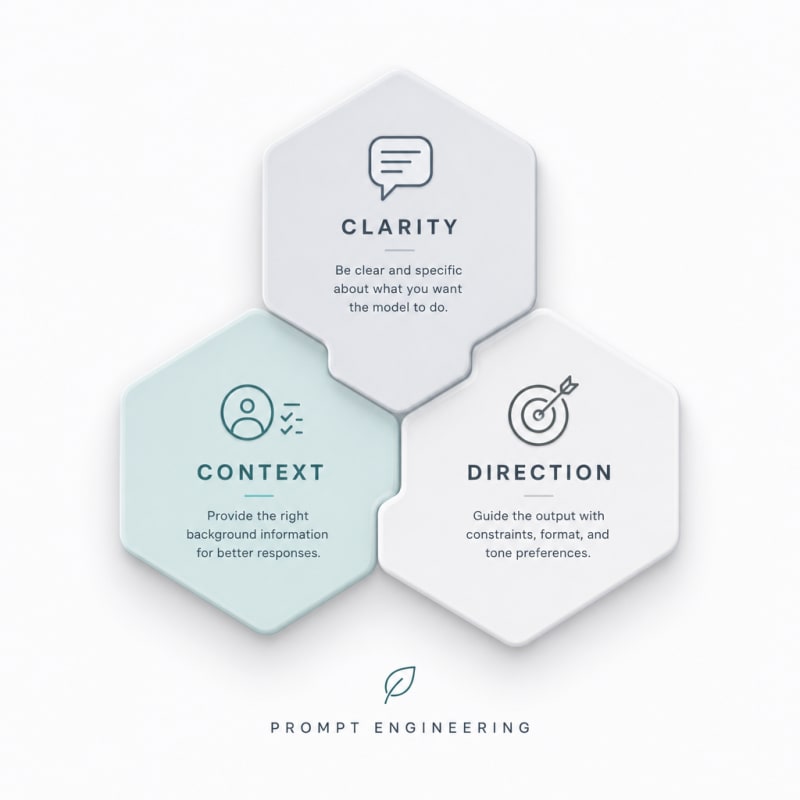
The quality of Claude's output directly correlates with the quality of your input. Effective prompt engineering starts with being specific about what you need.
Provide Clear Context and Requirements
Instead of asking "write a function to process data," give Claude the complete picture. Specify the programming language, the input format, expected output, error handling requirements, and any constraints. For example:
"Write a Python function that takes a list of dictionaries containing user data (name, email, age) and returns only users over 18 years old. Include input validation, handle missing fields gracefully, and add type hints."
This level of detail helps Claude generate code that's closer to production-ready on the first attempt.
Specify Your Coding Standards
Tell Claude about your preferred coding style, naming conventions, and documentation standards. If you want docstrings, specify the format (Google-style, NumPy, etc.). If you follow specific linting rules or use particular frameworks, mention them upfront. This reduces the back-and-forth needed to get code that fits your project.
Using Claude for Debugging and Code Review
Claude can serve as an excellent debugging partner when you provide the right information. Share the relevant code, the error message, what you expected to happen, and what actually happened. Include any relevant stack traces or logs.
For code review, ask Claude to evaluate specific aspects: security vulnerabilities, performance bottlenecks, readability issues, or adherence to best practices. The more focused your request, the more actionable the feedback.
Building Effective Automation Scripts
Automation is where Claude truly shines as one of the best AI productivity tools for developers. When creating automation scripts, break down your workflow into clear steps and explain the trigger conditions.
Start with the Big Picture
Describe the entire automation workflow before asking for code. For instance: "I need to automate our deployment process: pull from GitHub, run tests, build Docker containers, and deploy to staging if tests pass. Send Slack notifications at each step."
Once Claude understands the full scope, you can drill down into specific components.
Request Modular, Maintainable Code
Ask Claude to structure automation scripts with clear separation of concerns. Request functions that handle individual tasks, proper error handling, logging, and configuration management. This makes your automation more reliable and easier to modify later.
Iterating and Refining Your Code
Prompt engineering isn't just about the initial request. Learning to iterate effectively multiplies Claude's value.
When the first output isn't quite right, provide specific feedback. Instead of "this doesn't work," explain exactly what needs to change: "The function works but doesn't handle the case where the API returns a 429 rate limit error. Add exponential backoff retry logic."
Build on previous responses by referencing earlier parts of your conversation. Claude remembers the context, so you can say things like "modify the previous function to also log execution time" without repeating all the requirements.
Advanced Techniques for Power Users
Request Multiple Approaches
Ask Claude to provide multiple solutions with different trade-offs. "Show me three ways to implement this cache: one optimized for speed, one for memory efficiency, and one for simplicity." This helps you make informed architectural decisions.
Use Claude for Documentation
Beyond writing code, Claude can generate comprehensive documentation, README files, API references, and inline comments. Provide your code and specify the documentation format you need. This is particularly useful for maintaining older projects that lack proper documentation.
Leverage Claude for Learning
When working with unfamiliar libraries or concepts, ask Claude to explain while generating code. "Write a FastAPI endpoint for file uploads and explain each decorator and parameter." This accelerates learning while getting work done.
Common Pitfalls to Avoid
Even with the best prompts, there are traps to watch for. Don't blindly trust generated code—always review it for security issues, especially when handling user input or sensitive data. Claude can make mistakes with newer libraries or very specific edge cases.
Avoid extremely long, complex prompts that try to accomplish too much at once. Break large projects into smaller, manageable pieces. This makes debugging easier and produces better results.
Don't forget to test. Claude generates code that often works on the first try, but testing remains essential, particularly for production systems.
Integrating Claude into Your Development Workflow
To maximize productivity, think about where Claude fits into your existing processes. Use it during the planning phase to explore different architectural approaches. During development, leverage it for boilerplate code, repetitive tasks, and quick prototypes. In the maintenance phase, use it for refactoring, adding tests, and updating documentation.
The key is treating Claude as a collaborative tool rather than a replacement for your expertise. Your domain knowledge, combined with Claude's code generation capabilities, creates a powerful synergy.
Conclusion
Mastering prompt engineering and learning to work effectively with Claude can transform your development workflow. By providing clear context, being specific about requirements, iterating thoughtfully, and understanding Claude's strengths, you'll find yourself completing tasks faster and with higher quality results. As AI productivity tools continue to evolve, the developers who learn to leverage them effectively will have a significant competitive advantage. Start applying these techniques in your next project and refine your approach based on what works best for your specific use cases.
The Practical Solution
Start by treating Claude like a senior developer who needs full context, not a search engine. Write prompts that include language, input/output specs, constraints, and your coding standards. When debugging, share the complete picture: code, errors, expectations, and actual behavior. For automation, describe the entire workflow first, then drill into components while requesting modular, well-logged code. The difference between mediocre and exceptional results is often found in those first two sentences...
— Kevin Marsh, Editor-in-Chief
Synthetic Proof
Verified — Editorial Layer
This content has passed editorial verification for clarity, accuracy, and trust alignment.
Editor-in-Chief: Kevin Marsh
Verification Status: PASSED
Verification Status: PASSED
Comments
Post a Comment