Strategies for ensuring your asset’s chain of custody remains verifiable across any channel. A photograph appears in a news report. A legal document crosses a negotiation table. A research dataset underpins a policy decision. In each case, the same question arises: where did this content actually come from? For decades, that question was answerable through metadata, file properties, and institutional trust. But generative AI has fundamentally altered the equation. Content can now be created, modified, and redistributed at scale with minimal effort and near-perfect fidelity. The result is a provenance crisis that affects everything from newsrooms to courtrooms to corporate data operations. A credential can explain part of an asset’s history. Independent evaluation helps determine how much confidence the available evidence should support. Synthetic Proof is built for that wider trust assessment. The industry's response has largely centered on two technologies...
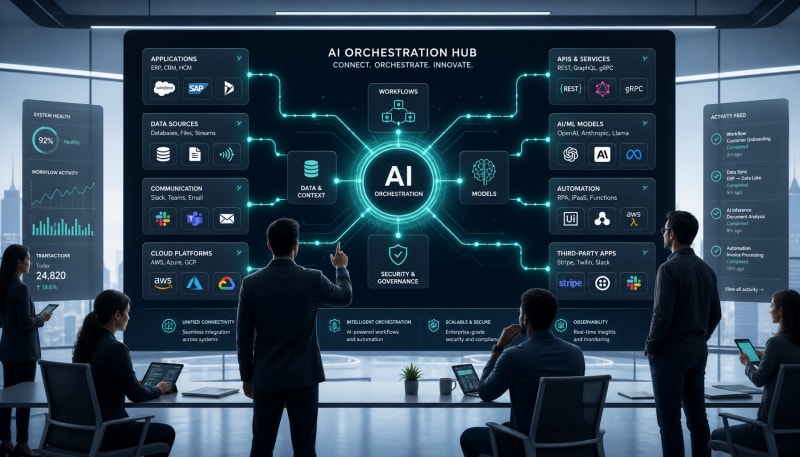
Learn how orchestration layers unify apps, APIs, automations, and AI systems into connected operational workflows.
Modern businesses operate with dozens of disconnected tools: CRMs, marketing platforms, data warehouses, customer support systems, and increasingly, AI models. Each serves a purpose, but when they can't communicate effectively, you end up with data silos, manual handoffs, and missed opportunities. AI orchestration solves this problem by creating intelligent workflows that connect your entire tech stack into a cohesive system.
Unlike simple automation that follows rigid if-then rules, AI orchestration uses intelligent decision-making to route data, trigger actions, and coordinate processes across multiple systems. It's the difference between a basic conveyor belt and a smart manufacturing line that adapts to what's moving through it.
Related: If you want the full operating system for AI workflows, prompts, ideation, and execution, Snapse OS brings the pieces together.
What Is AI Orchestration?
AI orchestration refers to the coordinated management of multiple AI models, applications, and data sources to execute complex workflows. Think of it as a conductor leading an orchestra—each instrument (or in this case, each system) plays its part at the right time, in harmony with the others.
At its core, workflow orchestration has been around for years. Traditional orchestration platforms execute predefined sequences of tasks across different systems. What makes AI orchestration different is the intelligence layer: machine learning models can make decisions about which path a workflow should take, what data to prioritize, when to escalate issues, and how to optimize processes in real-time.
The Key Components
Effective AI orchestration requires several foundational elements:
- Integration layer: Connects to APIs, databases, and applications across your stack
- Workflow engine: Executes the logical flow of data and tasks between systems
- AI/ML models: Provide intelligent decision-making, predictions, and classifications
- Data transformation: Normalizes and maps data between different system formats
- Monitoring and logging: Tracks performance, errors, and optimization opportunities
How Orchestration Layers Work
The orchestration layer sits between your applications and serves as the central nervous system of your tech stack. Rather than building point-to-point connections between every tool (which quickly becomes unmanageable), you connect each system to the orchestration platform once.
Here's how a typical orchestrated workflow operates:
A customer submits a support ticket. The orchestration layer receives this event and triggers a series of actions: it uses natural language processing to classify the issue, checks the CRM for customer history, assigns a priority score based on account value and issue severity, routes it to the appropriate team, and creates a task in your project management system. If the AI determines it's a simple question, it might automatically generate and send a response. All of this happens in seconds, without human intervention.
Synchronous vs. Asynchronous Orchestration
Orchestration workflows can run in two modes. Synchronous orchestration executes steps in sequence, waiting for each to complete before moving to the next. This works well when order matters and later steps depend on earlier results.
Asynchronous orchestration allows multiple processes to run in parallel. When a new lead comes in, you might simultaneously enrich their data from multiple sources, score them with a predictive model, and check for duplicate records. This parallel processing dramatically reduces total workflow time.
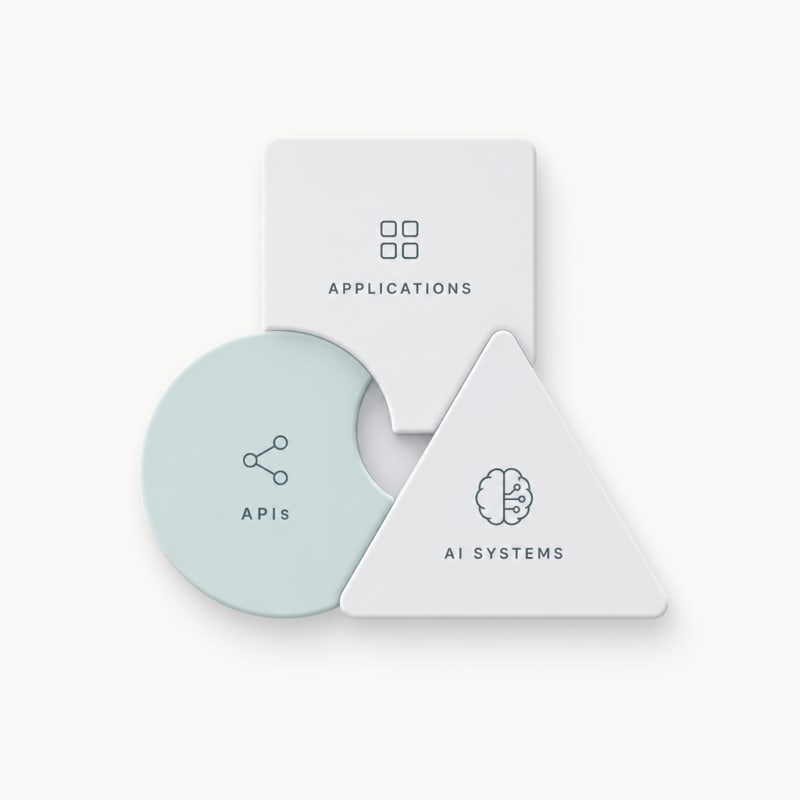
Unifying Apps, APIs, and AI Systems
The real power of AI orchestration emerges when you connect disparate systems that were never designed to work together. Your marketing automation platform, customer data platform, analytics tools, and AI models can all contribute to a single unified process.
Common Integration Patterns
Most AI integrations follow a few standard patterns. The data pipeline pattern continuously moves data from source systems into a central location where AI models can process it. The event-driven pattern triggers workflows based on specific actions—a purchase, a form submission, a threshold being crossed.
The request-response pattern works like a conversation: a system asks the orchestration layer for information or a decision, the AI processes the request, and returns a result. The batch processing pattern handles large volumes of data at scheduled intervals, useful for tasks like daily lead scoring or monthly customer segmentation.
Handling Data Transformation
Every application stores data differently. Your CRM might call it "company name" while your accounting system uses "account name" and your marketing platform says "organization." The orchestration layer handles these transformations, mapping fields and converting formats so systems can understand each other.
This transformation layer also handles data enrichment. As information moves through a workflow, the orchestration platform can append additional context—pulling in demographic data, calculating derived metrics, or adding AI-generated insights before passing it to the next system.
Real-World Orchestration Scenarios
Consider an e-commerce business managing inventory across multiple warehouses, marketplaces, and retail locations. An AI orchestration platform monitors stock levels in real-time, predicts demand using historical sales data and external factors like seasonality, automatically reorders from suppliers when inventory drops below optimized thresholds, and adjusts pricing across channels based on competition and margin targets.
In financial services, orchestration connects fraud detection models, transaction processing systems, customer databases, and compliance tools. When a suspicious transaction occurs, the workflow pulls customer history, runs it through multiple fraud detection models, checks against watchlists, calculates a risk score, and either approves, declines, or flags for manual review—all in milliseconds.
Healthcare organizations use workflow orchestration to coordinate patient care across multiple providers and systems. When test results arrive, AI models analyze them, update electronic health records, check for drug interactions with current medications, flag abnormal values to physicians, and schedule follow-up appointments based on clinical protocols.
Building Effective AI Workflows
Successful AI orchestration starts with mapping your current processes. Identify where data moves between systems, where manual handoffs occur, and where decisions get made. These transition points are orchestration opportunities.
Start simple. Choose a high-volume, repetitive process that involves multiple systems. Build a basic workflow that automates the mechanical parts—data entry, system updates, notifications. Then layer in intelligence: add an AI model that classifies, predicts, or optimizes one decision point in the workflow.
Error Handling and Resilience
Complex workflows spanning multiple systems will encounter failures. A good orchestration platform includes retry logic, fallback options, and exception handling. If an API call fails, the system might retry with exponential backoff, switch to an alternative data source, or route to a human for manual handling.
Design workflows with monitoring in mind. Track success rates, processing times, and error patterns. This telemetry helps you identify bottlenecks, optimize performance, and catch issues before they impact customers.
Governance and Control
As AI makes more decisions in your workflows, governance becomes critical. Implement approval gates for high-stakes actions, audit logs for compliance, and human-in-the-loop checkpoints where appropriate. The goal isn't to automate everything, but to automate what makes sense while maintaining control.
Version control matters for workflows just like it does for code. As you refine processes, test changes in staging environments before deploying to production. Keep rollback capabilities so you can quickly revert if an update causes issues.
Choosing Orchestration Tools
The orchestration platform landscape includes everything from code-first frameworks to no-code visual workflow builders. Developer-focused tools like Apache Airflow or Prefect give maximum flexibility and control. Low-code platforms like Zapier or Make enable business users to build workflows without programming.
Enterprise orchestration platforms offer the full spectrum: pre-built connectors to hundreds of applications, visual workflow designers, code extensibility, AI model hosting, and enterprise features like role-based access control and audit trails.
Your choice depends on technical resources, complexity requirements, and scale. A small team might start with a low-code platform and graduate to more sophisticated tools as needs grow. Large organizations often use multiple orchestration tools for different use cases, with a strategy to prevent fragmentation.
The Future of Intelligent Workflows
AI orchestration is evolving rapidly. Large language models are making it possible to build workflows using natural language descriptions rather than manual configuration. Autonomous agents can now plan and execute multi-step processes with minimal human guidance.
Self-optimizing workflows represent the next frontier. Rather than static logic, these systems continuously analyze their own performance and adjust decision points, timing, and routing to improve outcomes. They run experiments, measure results, and implement improvements automatically.
The line between orchestration platforms and AI development environments is blurring. Increasingly, these tools provide both workflow automation and the infrastructure to train, deploy, and monitor machine learning models—all in one integrated platform.
Conclusion
AI orchestration transforms disconnected applications into unified systems that work together intelligently. By connecting your tech stack through orchestration layers, you eliminate manual handoffs, reduce errors, and enable sophisticated workflows that adapt and optimize themselves over time. The technology is no longer limited to large enterprises with armies of developers—modern platforms make AI-powered workflow orchestration accessible to businesses of all sizes.
The key is starting with clear objectives, choosing processes where orchestration delivers measurable value, and building incrementally. As your orchestration capabilities mature, you'll find more opportunities to connect systems, automate decisions, and free your team to focus on strategic work rather than shuttling data between applications. The businesses that master AI orchestration won't just operate more efficiently—they'll be able to deliver experiences and insights that competitors with fragmented systems simply cannot match.
The Practical Solution
Map one repetitive cross-system process that currently requires manual handoffs—like lead routing, support ticket triage, or customer onboarding. Build a simple orchestration workflow connecting just two or three tools with basic decision logic, then add AI where it genuinely removes friction, not everywhere at once. The goal isn't full automation overnight; it's proving value on a single workflow, learning what breaks, then expanding from there.
— Kevin Marsh, Editor-in-Chief
SNAPSE OS
Build Your Full AI Workflow System
Get the full Snapse OS bundle with Prompt OS, ideation systems, and freelancer workflow tools in one operating system.
Explore Snapse OSSynthetic Proof
Verified — Editorial Layer
This content has passed editorial verification for clarity, accuracy, and trust alignment.
Editor-in-Chief: Kevin Marsh
Verification Status: PASSED
Verification Status: PASSED
Comments
Post a Comment