Learn why organizations are investing in verification instead of detection alone. For years, the fight against synthetic media manipulation followed a familiar pattern: researchers identified deepfake artifacts, built detection models around those signatures, and deployed them across platforms. Detection accuracy improved. Conferences celebrated breakthroughs. The industry felt like it was winning. Then generative AI became exponentially better at eliminating the very artifacts those systems were trained to find. As synthetic media improves, confidence increasingly comes from layered evidence rather than a binary label. Synthetic Proof helps organizations evaluate that evidence in context. What's emerging isn't simply a technical gap that better detection can close. It's a fundamental shift in how organizations must approach digital trust. The old model—detect manipulated content after it's created—assumes defenders can keep pace with attackers....
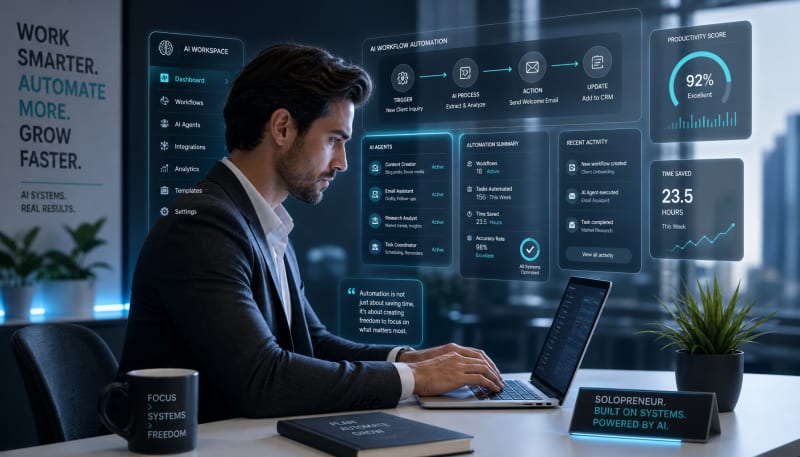
Explore automation workflows that save time and improve operational efficiency.
Running a business solo means wearing every hat—marketer, accountant, customer service rep, and strategist. The constant context-switching drains energy and limits growth. AI workflow automation changes this equation by handling repetitive tasks while you focus on work that actually moves the needle.
Unlike traditional automation that follows rigid if-then rules, AI-powered workflows adapt, learn, and handle nuanced tasks that once required human judgment. The result? You reclaim 10-15 hours weekly while maintaining quality and consistency across your business operations.
Related: If you want the full operating system for AI workflows, prompts, ideation, and execution, Snapse OS brings the pieces together.
Here are ten AI workflow automations that deliver immediate impact for solopreneurs.
1. Intelligent Email Triage and Response
Email remains one of the biggest time sinks for solopreneurs. An AI email assistant can categorize incoming messages, flag urgent items, draft responses to common inquiries, and even schedule follow-ups automatically.
Set up AI to recognize patterns in your inbox—support requests, sales inquiries, partnership opportunities, newsletters. The system routes each type appropriately: auto-responding to FAQs, creating task reminders for proposals, and surfacing only messages requiring personal attention.
The key is training your AI on your actual writing style by feeding it samples of past emails. This ensures responses sound authentic rather than robotic.
2. Content Repurposing Pipeline
Creating content once and manually reformatting it for different platforms wastes creative energy. Build an automation that takes one piece of long-form content and generates platform-specific versions.
Feed a blog post into your workflow, and AI extracts key points for Twitter threads, generates LinkedIn posts with professional framing, creates Instagram captions, produces email newsletter snippets, and even suggests video script outlines. Each output maintains your voice while adapting to platform conventions.
This multiplies your content reach without multiplying your workload.
3. Meeting Intelligence System
Meetings generate valuable information that often gets lost in scattered notes. An AI meeting workflow records conversations, generates accurate transcripts, extracts action items, identifies key decisions, and creates follow-up task lists.
The automation goes further by analyzing recurring themes across multiple meetings, tracking commitments made to clients, and flagging when discussed deadlines approach. This transforms meetings from time drains into structured, actionable intelligence.
Connect the output directly to your project management system so action items become tracked tasks automatically.
4. Customer Onboarding Sequence
First impressions matter, but manually onboarding each customer doesn't scale. An AI-powered onboarding workflow personalizes the experience based on customer data, purchase history, and engagement patterns.
The system sends welcome emails, delivers relevant resources based on the specific product or service purchased, answers common setup questions through chat, schedules check-in points, and escalates to you only when issues require personal intervention.
AI monitors engagement signals—which emails get opened, which resources get downloaded—and adjusts the sequence dynamically. Low engagement triggers different follow-ups than high engagement.
5. Social Media Listening and Engagement
Monitoring social media for brand mentions, relevant conversations, and engagement opportunities consumes hours daily. AI automation scans platforms for keywords, brand mentions, competitor activity, and industry discussions relevant to your niche.
The workflow filters noise, surfaces high-value interactions, drafts suggested responses, and identifies potential leads or partnership opportunities. You review and approve rather than manually searching and crafting each response from scratch.
Set parameters for automatic engagement on straightforward interactions like thanking someone for a mention, while flagging complex conversations for personal attention.
6. Proposal and Quote Generation
Creating custom proposals for each potential client takes significant time but remains necessary for closing deals. An AI workflow pulls information from initial client conversations, extracts project requirements, matches them to your service offerings, and generates tailored proposals.
The system incorporates your pricing structure, past project examples relevant to the prospect's industry, and customized timelines based on project scope. It even suggests upsell opportunities based on client needs expressed during discovery calls.
You review and refine rather than starting from a blank page each time.
7. Financial Tracking and Reporting
Bookkeeping feels like homework for most solopreneurs. AI workflows connect to your bank accounts, payment processors, and invoicing systems to categorize transactions automatically, match invoices to payments, flag unusual spending patterns, and generate financial reports.
The automation identifies tax-deductible expenses, tracks project profitability by client, monitors cash flow trends, and alerts you to late payments or unusual account activity. Monthly financial reviews become five-minute check-ins rather than multi-hour reconciliation sessions.
Set up recurring reports that arrive in your inbox showing key metrics without manual data compilation.
8. Lead Qualification and Nurturing
Not every lead deserves the same attention. AI scoring workflows analyze lead behavior—website visits, content downloads, email engagement, social interactions—and assign qualification scores.
High-scoring leads trigger immediate notifications and personalized outreach. Medium-scoring leads enter nurture sequences with relevant content based on their interests. Low-scoring leads receive minimal touches until behavior signals increased interest.
The system continuously updates scores as leads interact with your business, ensuring you focus energy on prospects most likely to convert while staying visible to others until timing improves.
9. Knowledge Base Management
Solopreneurs accumulate scattered knowledge across documents, notes, emails, and browser bookmarks. An AI knowledge management workflow indexes all your information sources, making everything searchable from one interface.
Ask natural language questions and receive answers synthesized from your entire knowledge base—past client work, research notes, saved articles, project documentation. The system identifies knowledge gaps, suggests connections between related information, and even generates documentation from your existing content.
This external brain ensures you never waste time searching for information you know you saved somewhere.
10. Performance Analytics Dashboard
Data lives in silos—website analytics, email metrics, social stats, financial data, project management tools. An AI analytics workflow pulls information from all sources, identifies meaningful patterns, and presents insights in a unified dashboard.
Rather than just displaying numbers, AI interpretation explains what metrics mean, highlights anomalies, predicts trends, and suggests actions based on data. Which marketing channels drive qualified leads? Which services generate highest margins? Where are bottlenecks slowing delivery?
Set up automated weekly or monthly reports that arrive with context and recommendations, not just raw data requiring interpretation.
Building Your Automation Stack
The most effective approach involves starting with the workflow consuming most of your time currently. Implement one automation, measure time saved, refine the process, then move to the next.
Modern no-code AI platforms make implementation accessible without technical expertise. Focus on workflows that touch multiple areas of your business for maximum leverage. An email automation that also updates your CRM and creates tasks in your project manager delivers more value than standalone tools.
Connect automations together so outputs from one feed inputs to others. Your meeting intelligence system should send action items to your task manager, which connects to your time tracking, which feeds your client reporting automation.
Common Implementation Mistakes
Avoid automating broken processes. Fix your workflow first, then automate the improved version. Don't over-automate customer interactions—maintain human touchpoints at critical moments. And resist building complex automations all at once. Simple workflows that work beat sophisticated systems that require constant troubleshooting.
Test automations with small batches before full deployment. Monitor outputs initially to catch errors or unexpected behaviors. Most AI workflows improve over time as they learn from corrections and feedback.
Conclusion
These ten AI workflow automations address the highest-impact areas of solopreneur operations—communication, content creation, customer management, financial tracking, and strategic decision-making. Each reclaims hours weekly while improving consistency and quality.
The goal isn't replacing your expertise but amplifying it. AI handles repetitive execution while you focus on strategy, creativity, and relationship-building that only humans can provide. Start with the automation addressing your biggest time drain today, then systematically build your stack over the coming months. The cumulative effect transforms how you work, creating capacity to scale your business without scaling your stress.
The Practical Solution
Start by picking one workflow where you're losing the most time—probably email or content distribution—and automate just that. Use existing tools like Zapier or Make connected to AI APIs rather than building from scratch. Spend two hours setting it up, then one week refining the outputs until they match your standards. The goal isn't perfect automation; it's reclaiming enough attention to focus on revenue-generating work that only you can do.
— Kevin Marsh, Editor-in-Chief
SNAPSE OS
Build Your Full AI Workflow System
Get the full Snapse OS bundle with Prompt OS, ideation systems, and freelancer workflow tools in one operating system.
Explore Snapse OSSynthetic Proof
Verified — Editorial Layer
This content has passed editorial verification for clarity, accuracy, and trust alignment.
Editor-in-Chief: Kevin Marsh
Verification Status: PASSED
Verification Status: PASSED
Comments
Post a Comment