Critical review showing why statistical models produce false positives and why deterministic provenance is superior. For the past several years, the prevailing strategy for combating synthetic media has been detection: build better classifiers, train on larger datasets, identify artifacts faster than generative models can eliminate them. The logic seemed sound. If AI can create deepfakes, AI can also detect them. Except it hasn't worked. The value of provenance ultimately depends on whether organizations can turn evidence into confident decisions. Synthetic Proof helps examine that broader trust picture across AI content and workflows. Detection-based approaches have reached an operational ceiling. They struggle against modern generative models, degrade rapidly as those models improve, and offer no mechanism to verify authenticity when detection fails. Organizations deploying deepfake detectors today are discovering what researchers have known quietly for s...

Explore the emerging trends shaping AI—from autonomous agents and multimodal models to trust, verification, and the systems that will define the next generation of work.
Service providers are drowning in client work while struggling to maintain consistency. If you're a consultant, freelancer, or agency owner trying to scale without sacrificing quality, AI isn't just a nice-to-have anymore—it's the difference between staying stuck at your current capacity and building a business that runs without you micromanaging every detail.
The real question isn't whether to use AI, but which tools actually deliver on their promises and how to stack them into a system that improves your delivery, tightens your client processes, and creates repeatable operations you can hand off or automate.
Related: If you want the full operating system for AI workflows, prompts, ideation, and execution, Snapse OS brings the pieces together.
Building Your AI Productivity Stack From the Ground Up
Most service providers make the mistake of collecting random AI tools without a system. They sign up for everything, use nothing consistently, and wonder why they're still working 60-hour weeks. The best ai tools for solopreneurs work together as a stack, not as isolated solutions.
Start with three layers: client communication, project execution, and knowledge management. Each layer needs one or two solid tools that talk to each other, not a dozen disconnected apps that create more work than they solve.
Layer One: Client Communication and Intake
Your intake process sets the tone for everything that follows. Use AI-powered form builders and chatbots to qualify leads before they hit your calendar. Tools like Typeform with AI logic branching or custom GPT assistants can handle the first three rounds of questions that used to eat up your discovery calls.
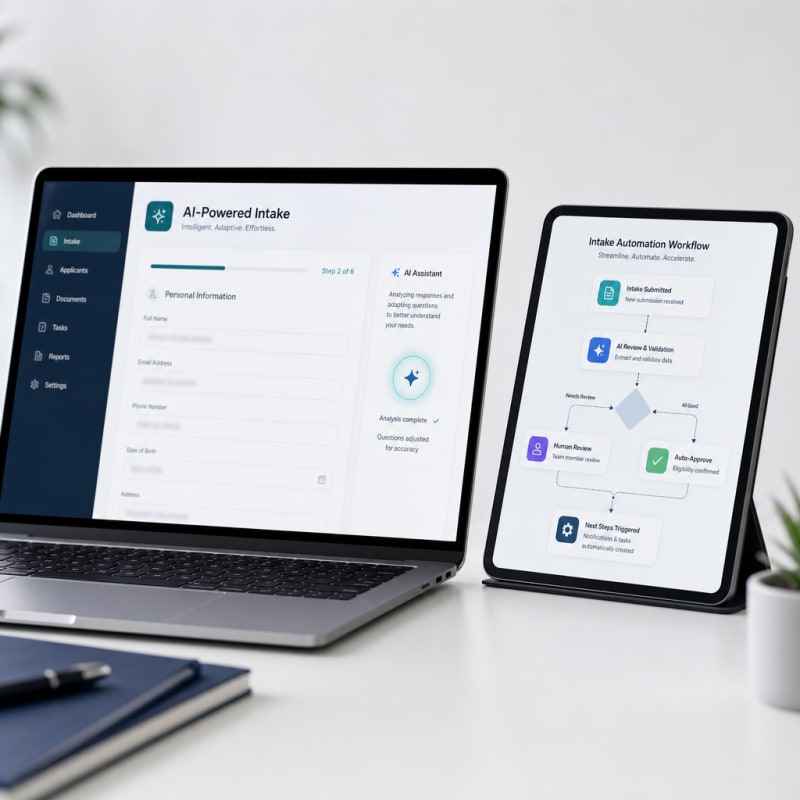
The goal is capturing structured information in a format your delivery system can actually use. When a client fills out an AI-enhanced intake form, the responses should automatically populate your project brief, contract variables, and initial timeline without you touching a keyboard.
Layer Two: Project Execution and Delivery
This is where business ai tools actually prove their worth. You need systems that turn client requirements into deliverables without reinventing your process every time. AI writing assistants, design tools, and code generators belong here, but only if they're connected to templates and standard operating procedures you've already refined.
Create master templates for your most common deliverables. Then use AI to customize them based on client-specific inputs. A content strategist might have AI analyze a client's existing content, identify gaps, and populate a strategy template. A web developer could use AI to generate boilerplate code based on project specs captured during intake.
The key is repeatability. Every project should follow the same workflow with AI handling the variable parts—research, first drafts, data analysis, formatting—while you focus on strategy, refinement, and client relationships.
Tactical Implementation: Your First 30 Days
Stop trying to transform everything at once. Pick your biggest bottleneck and build an AI solution for that single problem. Most service providers waste hours on status updates, revisions, and project management busywork. Start there.
Week One: Audit Your Time
Track where your hours actually go for five business days. Not where you think they go—where they actually go. You'll probably find that 40% of your time is spent on communication, documentation, and administrative tasks that AI can handle.
Identify the three tasks you do most often that feel like busywork. These are your AI automation targets. Common examples: writing project status emails, creating client reports, scheduling and prep, reformatting deliverables, or research and data gathering.
Week Two: Build Your Core Templates
You can't automate what you haven't systematized. Take your three target tasks and document exactly how you do them now. Write out the steps, the decisions you make, the quality standards you apply. This becomes your AI prompt library.
For each task, create a template with clear variable fields. If you're automating status emails, your template needs project name, completed items, upcoming milestones, blockers, and next steps. Your AI tool fills in the variables based on your project management data.
Week Three: Implement One AI Tool Per Task
Use a clear folder structure for each client and project. Keep contracts, briefs, working files, final deliverables, and invoices in predictable locations so you are not searching through scattered folders every time a client asks for something.
Create a repeatable delivery checklist before marking any project complete. Confirm the final files are named properly, the client has access, the invoice is sent, and the follow-up message is scheduled. This turns delivery from a memory-based task into a reliable process.
Start Small and Improve the System Over Time
You do not need to systemize your entire freelance business at once. Start with the area that creates the most friction: onboarding, communication, delivery, or invoicing. Build one simple repeatable process, test it with a few clients, then refine it based on what actually saves time.
The goal is not to make your freelance business feel robotic. The goal is to protect your energy, reduce preventable mistakes, and create a smoother experience for clients. When your operations are systemized, you can spend more time doing the work clients hired you for and less time managing chaos behind the scenes.
Now you're ready to add tools to your ai productivity stack. Match each task to a specific tool and integration. Use ChatGPT or Claude for writing and communication tasks,
The Practical Solution
Start by tracking where your time actually goes for one week, then identify the three repetitive tasks eating most of your hours. Focus on automating client intake, project briefs, and status updates first since these create compounding time savings. The goal isn't collecting tools, it's building a repeatable system where AI handles the variables. Ultimately freeing up time for you to control the strategy.
— Kevin Marsh, Editor-in-Chief
Synthetic Proof
Verified — Editorial Layer
This content has passed editorial verification for clarity, accuracy, and trust alignment.
Editor-in-Chief: Kevin Marsh
Verification Status: PASSED
Verification Status: PASSED
Comments
Post a Comment