Critical review showing why statistical models produce false positives and why deterministic provenance is superior. For the past several years, the prevailing strategy for combating synthetic media has been detection: build better classifiers, train on larger datasets, identify artifacts faster than generative models can eliminate them. The logic seemed sound. If AI can create deepfakes, AI can also detect them. Except it hasn't worked. The value of provenance ultimately depends on whether organizations can turn evidence into confident decisions. Synthetic Proof helps examine that broader trust picture across AI content and workflows. Detection-based approaches have reached an operational ceiling. They struggle against modern generative models, degrade rapidly as those models improve, and offer no mechanism to verify authenticity when detection fails. Organizations deploying deepfake detectors today are discovering what researchers have known quietly for s...
Software architects rather than manual coders.
The phrase "vibe coding" has emerged from the primordial soup of AI development culture, describing a workflow approach where developers lean heavily on AI assistants to generate code through conversational prompts rather than writing every line manually. It's a contentious topic that splits the development community into camps: those who embrace this new paradigm and those who view it as a dangerous shortcut that undermines fundamental programming skills.
Understanding this debate requires examining not just the mechanics of AI-assisted development, but the broader transformation happening in how we think about ai workflows, ai systems, and the very nature of software creation itself. This isn't simply about choosing between typing code or asking an AI to do it—it's about recognizing when each approach serves your needs and how both fit into the evolving landscape of development.
Related: If you want to operationalize prompting into a repeatable workflow, Snapse Prompt OS is built for exactly that.
Understanding the Vibe Code Phenomenon
Vibe coding represents a fundamental shift in the relationship between developer and machine. Rather than meticulously crafting each function, loop, and conditional statement, developers describe their intentions in natural language and let AI systems translate those intentions into working code. The "vibe" element refers to the intuitive, conversational nature of this interaction—you're communicating the essence or feeling of what you want, and the AI fills in the technical details.
This approach works because modern AI systems have been trained on vast repositories of code across multiple languages and frameworks. They've internalized patterns, best practices, and common solutions to recurring problems. When you describe what you need, these systems draw on that knowledge to generate relevant code snippets or entire functions that match your requirements.
The Technical Reality Behind AI Code Generation
At its core, vibe coding relies on large language models that have been specifically fine-tuned for code generation. These models don't simply copy-paste existing code—they synthesize new solutions based on patterns they've learned. When you provide a prompt describing functionality, the AI system processes your natural language input, maps it to programming concepts, and generates syntactically correct code that attempts to fulfill your specification.
The quality of output depends heavily on prompt specificity and context. A vague request like "make a login function" yields generic results, while a detailed prompt specifying authentication method, error handling requirements, and security constraints produces more tailored, production-ready code.
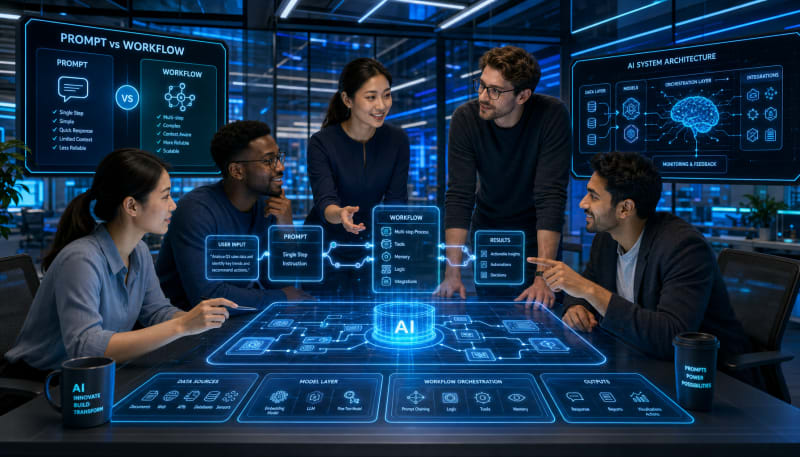
Prompt vs Workflow: Two Distinct Paradigms
The distinction between prompt-based development and workflow-based development represents one of the most important concepts in modern AI-assisted programming. Understanding this difference helps clarify when vibe coding makes sense and when more structured approaches are necessary.
A prompt represents a single, discrete request for AI assistance. You describe what you need, the AI generates a response, and you evaluate whether that response meets your requirements. This works excellently for isolated problems: generating a utility function, writing a regex pattern, creating a database query, or scaffolding a simple component.
Workflows, by contrast, involve multiple interconnected steps where outputs from one stage feed into subsequent stages. In ai workflows, you're not just asking for a single piece of code—you're orchestrating a sequence of AI-assisted operations that build upon each other. This might include analyzing requirements, generating architecture diagrams, creating data models, implementing business logic, writing tests, and optimizing performance.
When Prompts Are Sufficient
Single prompts excel in situations with clear, bounded requirements. If you need to convert a timestamp format, parse JSON data, or implement a well-defined algorithm, a straightforward prompt to an AI assistant can generate working code in seconds. These scenarios share common characteristics: they're self-contained, have established best practices, and don't require extensive context about your broader system architecture.
For experienced developers, prompts serve as accelerators rather than replacements. You know what you need, you understand how it fits into your system, and you're capable of evaluating and modifying the generated code. The AI simply speeds up the mechanical typing and helps you avoid syntax errors or forgotten edge cases.
When Workflows Become Necessary
Complex projects demand more sophisticated approaches. Building a complete feature, refactoring a module, or implementing a new service involves dozens of interdependent decisions. This is where ai automation basics come into play through structured workflows that break large problems into manageable steps.
Consider building a REST API endpoint. A workflow approach might involve: analyzing the data requirements, designing the database schema, generating migration scripts, implementing the endpoint logic, creating input validation, writing unit tests, and generating API documentation. Each step informs the next, and the AI system maintains context throughout the entire process.
How AI Workflows Work in Practice
Understanding how ai workflows work requires looking beyond individual code generation to see the orchestration layer that manages complex development tasks. Modern AI development platforms implement workflows through several mechanisms.
Context management stands as the foundation. The system maintains awareness of your project structure, existing code, dependencies, and coding standards. When you request new functionality, the AI doesn't generate code in isolation—it considers how that code integrates with your existing system.
Iterative refinement allows workflows to evolve outputs through multiple passes. The initial generation might focus on core functionality, followed by iterations that add error handling, optimize performance, improve readability, and ensure security best practices. Each iteration builds on the previous version while incorporating feedback.
Validation and testing loops automatically verify that generated code meets requirements. This might include running unit tests, checking for security vulnerabilities, validating against coding standards, or even simulating runtime behavior to catch potential issues before human review.
The Role of Human Oversight
Despite automation advances, human developers remain essential in ai workflows. You provide the architectural vision, make judgment calls on trade-offs, and verify that generated solutions align with business requirements. The AI handles mechanical implementation details, but you maintain responsibility for the overall system design and code quality.
This partnership model represents the most productive use of AI in development. Rather than viewing vibe coding as replacement for traditional skills, successful developers treat it as augmentation—a force multiplier that handles routine tasks while freeing cognitive resources for higher-level problem solving.
The Case For Vibe Coding
Proponents of vibe coding point to significant productivity gains. Tasks that once consumed hours can be completed in minutes. Boilerplate code, type definitions, test scaffolding, and documentation can be generated automatically, allowing developers to focus on unique business logic and system architecture.
The approach also democratizes development to some degree. Junior developers gain access to expert-level code patterns and best practices encoded in AI systems. Someone with limited experience in a particular framework can still produce functional code by describing their needs clearly, then learning from and adapting the generated output.
For rapid prototyping and experimentation, vibe coding proves invaluable. You can explore multiple implementation approaches quickly, compare different architectural patterns, and validate ideas without investing days in manual coding. This accelerates the discovery phase of development and helps teams make better informed decisions.
The Case Against Vibe Coding
Critics raise legitimate concerns about over-reliance on AI code generation. When developers skip the process of manually implementing algorithms and data structures, they miss opportunities to develop deep understanding of how systems actually work. This knowledge gap becomes problematic when debugging complex issues or optimizing performance bottlenecks.
Code quality represents another concern. AI-generated code may work functionally but contain subtle inefficiencies, security vulnerabilities, or maintainability issues that aren't immediately obvious. Developers who lack the experience to recognize these problems might ship suboptimal code to production.
There's also the risk of homogenization. When everyone relies on the same AI systems trained on similar datasets, codebases begin to converge toward similar patterns and approaches. This reduces diversity in problem-solving strategies and may lead to widespread adoption of suboptimal practices if the training data contains them.
Finding the Balanced Approach
The question isn't whether to vibe code or not—it's understanding when each approach serves your objectives. Different contexts demand different strategies, and the most effective developers fluidly shift between manual coding and AI-assisted workflows based on the task at hand.
For learning and skill development, manually implementing algorithms and data structures remains essential. You need to understand what the code does, why it works, and what trade-offs it embodies. Use AI as a reference and teaching tool, but write the code yourself to build genuine understanding.
For production development, leverage ai systems strategically. Let AI handle routine implementations, generate test cases, create documentation, and suggest optimizations. But maintain full understanding of generated code, review it critically, and modify it to match your specific requirements and constraints.
For exploration and prototyping, embrace vibe coding fully. Generate multiple implementations quickly, compare approaches, and identify the most promising direction before investing in manual refinement. The speed advantage here directly translates to better decision-making and reduced risk.
Final Thoughts
The vibe coding debate reflects a larger transformation in software development. As AI systems become more capable, the nature of programming work shifts from mechanical implementation toward higher-level design, architecture, and problem decomposition. This isn't a degradation of the profession—it's an evolution toward more cognitively demanding and creatively fulfilling work.
The answer to "vibe code or not" isn't binary. Effective developers in the AI era will master both traditional programming fundamentals and modern AI-assisted workflows. They'll understand ai automation basics well enough to orchestrate complex development tasks, while maintaining the deep technical knowledge required to evaluate, modify, and optimize AI-generated code.
Success requires intentionality. Use AI systems to amplify your capabilities, not replace your thinking. Build genuine understanding of the code you ship, regardless of how it was generated. And recognize that the tools are evolving rapidly—what works today may be obsolete tomorrow as ai workflows become more sophisticated and integrated into development environments. The key is maintaining adaptability while preserving the core skills that make you effective as a developer.
SNAPSE
Operationalize Better Prompting
Turn scattered prompts into a repeatable workflow with Snapse Prompt OS.
Explore Prompt OSSynthetic Proof
Verified — Editorial Layer
This content has passed editorial verification for clarity, accuracy, and trust alignment.
Editor-in-Chief: Kevin Marsh
Verification Status: PASSED
Verification Status: PASSED
Comments
Post a Comment