Critical review showing why statistical models produce false positives and why deterministic provenance is superior. For the past several years, the prevailing strategy for combating synthetic media has been detection: build better classifiers, train on larger datasets, identify artifacts faster than generative models can eliminate them. The logic seemed sound. If AI can create deepfakes, AI can also detect them. Except it hasn't worked. The value of provenance ultimately depends on whether organizations can turn evidence into confident decisions. Synthetic Proof helps examine that broader trust picture across AI content and workflows. Detection-based approaches have reached an operational ceiling. They struggle against modern generative models, degrade rapidly as those models improve, and offer no mechanism to verify authenticity when detection fails. Organizations deploying deepfake detectors today are discovering what researchers have known quietly for s...

Understand the fundamentals of automation and start building practical systems.
If you're running a business solo or managing multiple projects, you've probably felt the weight of repetitive tasks eating into your day. The good news is that AI-powered automation has moved beyond enterprise-level tools and become accessible to anyone willing to spend a few hours learning the basics. This guide will walk you through the fundamentals of setting up automated workflows that actually work for your business.
What Is AI-Powered Automation?
AI-powered automation combines traditional workflow automation with artificial intelligence to handle tasks that previously required human judgment. Unlike simple automation that follows rigid if-then rules, AI automation can process natural language, make decisions based on context, and improve over time.
Related: If you want the full operating system for AI workflows, prompts, ideation, and execution, Snapse OS brings the pieces together.
Think of it this way: basic automation might forward emails with specific keywords to a folder. AI automation can read those emails, understand the intent, draft appropriate responses, and only flag the ones that need your personal attention.
Why Solopreneurs Need an AI Productivity Stack
When you're wearing every hat in your business, time is your most valuable resource. The best ai tools for solopreneurs don't just save time—they multiply your capacity to deliver quality work. Here's what a solid automation setup can handle:
- Customer communication and follow-ups
- Content creation and scheduling
- Data entry and organization
- Invoice generation and payment tracking
- Meeting scheduling and preparation
- Research and information gathering
The key is building a stack that works together rather than collecting disconnected tools that create more work.
Building Your First AI Workflow
Start With One Problem
Don't try to automate everything at once. Pick a single task that meets these criteria: it's repetitive, time-consuming, and follows a predictable pattern. Email triage, social media posting, or customer onboarding are good starting points.
Map the Current Process
Write down every step you currently take to complete this task. Be specific. If you're automating email responses, your process might include: checking inbox, reading email, determining urgency, drafting response, sending reply, and filing the conversation.
Identify Automation Points
Look at each step and ask: Could AI do this? Should it? Some steps are perfect for full automation, while others benefit from AI assistance with human oversight. Business ai tools work best when they handle the grunt work while you focus on decisions that require creativity or relationship management.
Essential Tools for Your AI Productivity Stack
Workflow Connectors
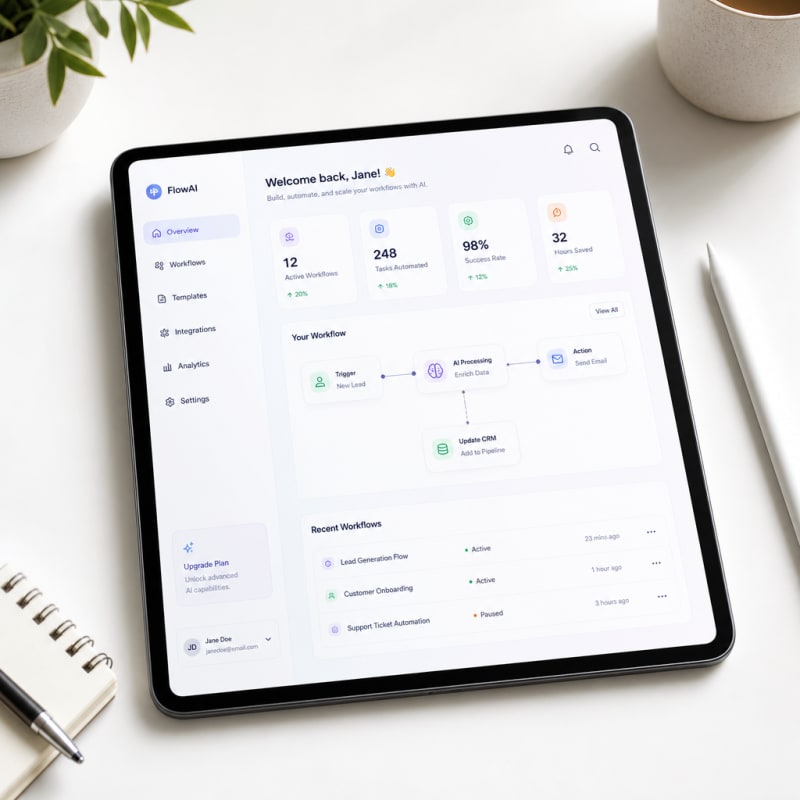
Tools like Zapier and Make (formerly Integromat) connect different applications and trigger actions based on events. When someone fills out your contact form, a workflow connector can add them to your CRM, send a welcome email, and create a task for follow-up—all without your involvement.
AI Writing Assistants
These tools handle content generation, from email drafts to blog outlines. The latest models understand context well enough to maintain your brand voice across communications. They're not replacing your writing—they're giving you a strong first draft to refine.
Smart Scheduling
AI scheduling tools learn your preferences, identify optimal meeting times, and handle the back-and-forth of finding slots that work for multiple people. They integrate with your calendar and can even prepare briefing documents based on previous interactions.
Document Processing
These tools extract data from invoices, receipts, contracts, and forms, then route that information to the right place in your system. What used to take 15 minutes of manual data entry now happens in seconds.
Common Mistakes to Avoid
Over-Automating Too Soon
The most common mistake beginners make is trying to automate everything at once. Start with one repetitive task, prove that the workflow works, then expand. Automation compounds best when each layer is tested before another layer is added.
Ignoring the Human Review Step
AI can move work faster, but speed without review can create messy outputs, missed details, or poor customer experiences. Keep a human checkpoint in place for anything that affects clients, money, contracts, publishing, or brand reputation.
Using Too Many Tools Without a System
Adding more apps does not automatically create better productivity. The goal is not to collect tools. The goal is to build a connected system where each tool has a clear role, a clear input, and a clear output.
How to Start Learning Automation
The easiest way to start is by choosing one workflow you already repeat every week. It could be saving leads, summarizing emails, organizing content ideas, sending follow-ups, or turning notes into tasks.
Write down the steps manually first. Then identify which parts can be automated, which parts need AI assistance, and which parts still require your judgment. This gives you a practical map instead of guessing inside a tool.
A Simple Beginner Automation Example
For example, a solopreneur could connect a contact form to a spreadsheet, send the lead a confirmation email, create a task in their project management tool, and notify themselves in Slack. That single workflow removes several manual steps while keeping the business owner in control.
Final Thoughts
Learning automation is not about replacing your judgment. It is about protecting your time. The best AI productivity systems remove repetitive work, organize information, and help you respond faster without losing quality.
Start small, document your process, and improve the workflow over time. That is how automation becomes more than a shortcut. It becomes part of the way your business operates.
Synthetic Proof
Verified — Editorial Layer
This content has passed editorial verification for clarity, accuracy, and trust alignment.
Editor-in-Chief: Kevin Marsh
Verification Status: PASSED
Verification Status: PASSED
Comments
Post a Comment