Learn how digital provenance evolved from research into a cornerstone of AI governance and enterprise trust. A decade ago, provenance was mostly a concern for art collectors and archivists. Today, it's becoming foundational infrastructure for organizations deploying AI at scale. The shift happened quietly, then suddenly—driven not by technology alone, but by a collision of regulatory pressure, reputational risk, and the uncomfortable realization that most organizations cannot answer basic questions about their AI systems. Digital provenance—the verifiable record of an asset's origin, transformations, and custody—has evolved from a niche technical capability into a governance requirement. The reasons are straightforward: AI systems are being deployed in consequential settings, regulators are demanding accountability, and the penalties for getting it wrong are no longer theoretical. Provenance is becoming one part of a larger operational trust question: ca...

A practical framework for automating repetitive tasks without overcomplicating your systems.
Building an AI automation strategy doesn't require a computer science degree or a massive budget. What it does require is a clear understanding of your current processes, the right mindset about where AI fits, and a systematic approach to implementation. Most beginners fail because they start with the technology instead of the problem. The smartest workflows emerge when you identify repetitive tasks, map out decision points, and then apply AI tools strategically.
This guide walks you through the essential steps for creating beginner automation workflows that actually work. You'll learn how to audit your existing systems, choose the right automation opportunities, and build AI-powered processes that scale with your needs.
Related: If your work depends on client delivery, handoffs, and repeatable execution, The Freelancer & Contractor Hub helps structure the process.
Understanding AI Automation vs. Traditional Automation
Traditional automation follows rigid if-then rules. If a form is submitted, then send an email. If inventory drops below ten units, then reorder. These workflows are predictable and reliable, but they can't handle nuance or make judgment calls.
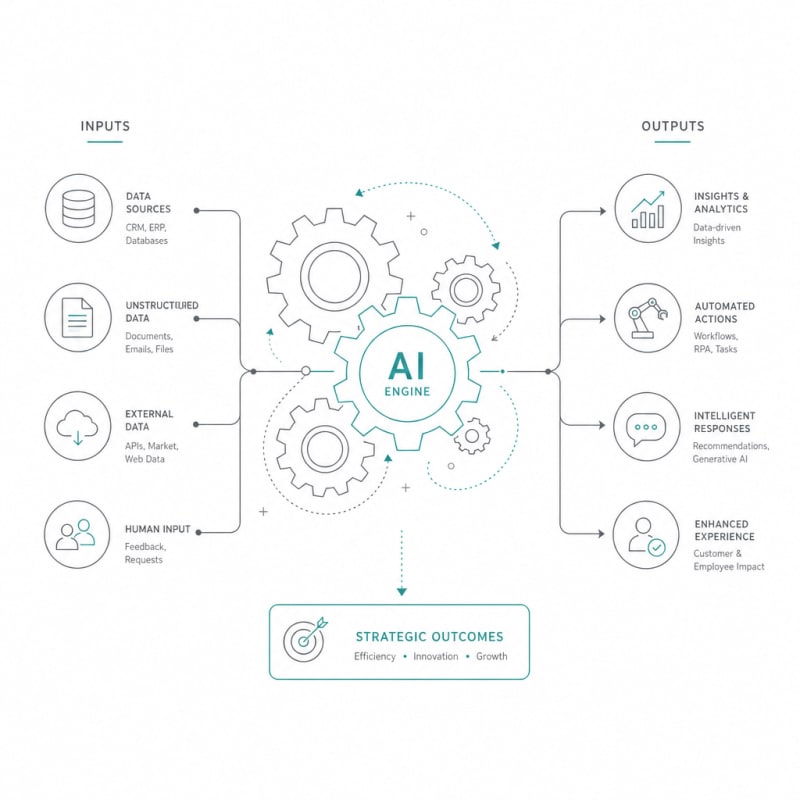
AI automation introduces decision-making capability. An AI system can read incoming emails and categorize them by urgency and topic. It can analyze customer support tickets and route complex issues to specialists while handling simple requests automatically. The difference matters because it determines which tasks you can realistically automate.
For beginners, the sweet spot lies in combining both approaches. Use traditional automation for straightforward triggers and actions, then layer in AI where you need interpretation, classification, or content generation.
Mapping Your Automation Opportunities
Before touching any AI tools, spend time documenting what you actually do. The goal is to identify tasks that meet three criteria: they're repetitive, they're time-consuming, and they follow a pattern you can describe.
The Task Audit Process
Track your activities for one week. Every time you complete a task, note whether it's something you've done before in essentially the same way. Pay special attention to tasks involving data entry, content creation, scheduling, sorting, or responding to common questions.
Create a simple spreadsheet with columns for task name, frequency, time required, and complexity. Complexity here means how many decisions you make while completing it. Responding to a standard inquiry might take five minutes but involve zero real decisions. Writing a custom proposal might take an hour and require constant judgment calls.
Your best automation candidates are high-frequency, high-time-cost tasks with low to medium complexity. These give you the biggest return on your automation investment.
Priority Matrix for Automation
Once you have your task list, plot each item on a simple matrix. One axis represents impact (how much time or money you'd save by automating it). The other represents difficulty (how hard it would be to automate given your current skills and tools).
Start with high-impact, low-difficulty tasks. These are your quick wins. Common examples include automated email responses, data extraction from documents, meeting scheduling, social media posting, and basic report generation.
Choosing Your AI Automation Tools
The AI automation landscape is crowded with options. As a beginner, you want tools that offer pre-built integrations, visual workflow builders, and clear documentation. You're not building custom machine learning models. You're connecting existing AI capabilities to your specific needs.
Essential Tool Categories
Workflow platforms like Zapier, Make, or n8n let you connect different apps and services. They've added AI features that let you generate text, analyze sentiment, extract information, and make decisions within your workflows.
AI assistants including ChatGPT, Claude, or similar tools can be integrated via API to handle content generation, summarization, translation, and analysis tasks within your automated processes.
Specialized AI tools address specific functions. Document processing tools extract data from invoices or receipts. Transcription services convert audio to text. Image recognition tools categorize and tag photos. Choose specialized tools when accuracy matters more than flexibility.
Start with one workflow platform and one general-purpose AI assistant. Learn these tools thoroughly before adding more to your stack.
Building Your First Beginner Automation Workflow
Let's walk through creating a practical workflow from scratch. This example automates the process of handling incoming customer inquiries sent via email.
Step 1: Define the Trigger
Your workflow needs a starting point. In this case, the trigger is a new email arriving in a specific inbox or with a particular label. Most workflow platforms can monitor email accounts and fire when conditions are met.
Step 2: Extract and Analyze
Once the email arrives, send its content to an AI system for analysis. Ask the AI to identify the inquiry type (question about product, technical support request, billing issue, etc.) and assess the urgency based on language cues.
Your prompt to the AI might look like this: "Analyze this customer email. Identify the primary issue category and rate urgency as low, medium, or high. Return your answer in JSON format with category and urgency fields."
Step 3: Route and Respond
Based on the AI's classification, your workflow branches. High-urgency items get forwarded immediately to relevant team members with a Slack notification. Medium-urgency items are added to a task management system with appropriate due dates. Low-urgency common questions trigger an automated response generated by AI based on your knowledge base.
Step 4: Log and Learn
Every workflow action should log to a central spreadsheet or database. Record what the AI decided, which path the workflow took, and any human interventions required. This data helps you refine the system over time.
Testing and Refining Your AI Systems
Your first version will not be perfect. Plan for iteration from day one. Run new workflows in parallel with your existing process for at least a week. Check the automated outputs against what you would have done manually.
Common issues beginners face include AI misclassifications, edge cases the workflow doesn't handle, and integration failures between tools. Address these by adding error handling, creating fallback paths, and improving your AI prompts.
The Feedback Loop
Build in a simple way to mark when the automation gets something wrong. This might be a "flag for review" button in your task management system or a quick form team members can submit. Review flagged items weekly and look for patterns.
If the AI consistently miscategorizes a particular type of inquiry, update your classification prompt with specific examples. If certain edge cases break the workflow, add conditional branches to handle them.
Scaling Your Automation Strategy
Once you have one reliable workflow running, you can expand systematically. Use the same methodology: audit tasks, identify high-value opportunities, build incrementally, test thoroughly, and refine based on real results.
Avoid the temptation to automate everything at once. Each new workflow adds complexity to your systems. You need time to understand how automated processes interact, where bottlenecks emerge, and what maintenance requirements look like.
A good rule is to add one new workflow per month. This pace lets you integrate automation into your work habits rather than disrupting everything simultaneously.
Documentation and Maintenance
Every workflow you build should have basic documentation. Record what triggers it, what decisions it makes, which tools it uses, and who to contact when something breaks. Store this in a shared document your team can access.
Schedule monthly reviews of your automation stack. Check whether workflows are still serving their intended purpose. Remove automations that no longer add value. Update AI prompts as your understanding improves or your business needs change.
Common Pitfalls in AI Automation Strategy
Beginners often over-engineer their first workflows. They try to handle every possible scenario and build elaborate branching logic. Start simple. Handle the 80% case first, then expand to cover edge cases only if they actually occur frequently.
Another mistake is treating AI as infallible. AI systems make mistakes, sometimes confidently. Always include human review points for high-stakes decisions. Use automation to assist and accelerate, not to remove human judgment entirely.
Tool sprawl happens when you keep adding new platforms without consolidating. Each additional tool means another login, another API to maintain, and another potential point of failure. Prefer doing more with fewer tools over adding specialized solutions for every task.
Measuring Success
Track specific metrics for each workflow. Time saved is the most obvious measure, but also consider error rates, user satisfaction, and cost per transaction. Compare automated processes against the manual baseline you documented during your initial audit.
Not every automation will deliver the results you expect. Some tasks that seem perfect for automation turn out to require more human judgment than anticipated. Other tasks you assumed were too complex become surprisingly easy to automate once you break them down.
Be willing to shut down workflows that aren't working. Failed experiments teach you as much as successful ones.
Conclusion
Building an effective AI automation strategy comes down to systematic thinking rather than technical wizardry. Start by understanding your current processes and identifying genuine automation opportunities. Choose beginner-friendly tools that connect easily and offer visual interfaces. Build one workflow at a time, test thoroughly, and refine based on real-world results.
The best AI systems emerge from iteration. Your first automated workflow will be basic, and that's exactly what it should be. As you gain experience, you'll develop intuition about which tasks to automate, how to structure workflows for reliability, and where human oversight remains essential. Focus on creating reliable, maintainable systems that solve real problems rather than chasing the latest AI capabilities. The goal isn't to automate everything—it's to free yourself from repetitive work so you can focus on tasks that require creativity, strategy, and human connection.
The Practical Solution
Start by documenting one week of your actual work, identify three high-frequency tasks that consume the most time. Choose a visual workflow platform like Zapier or Make, and build one simple automation combining traditional triggers with AI. The goal isn't perfect automation—it's reducing repetitive work by half while learning what actually works in your environment.
— Kevin Marsh, Editor-in-Chief
SNAPSE
Run Client Work More Smoothly
Use structured systems for delivery, handoff, and repeatable execution.
Explore Freelancer & Contractor HubSynthetic Proof
Verified — Editorial Layer
This content has passed editorial verification for clarity, accuracy, and trust alignment.
Editor-in-Chief: Kevin Marsh
Verification Status: PASSED
Verification Status: PASSED
Comments
Post a Comment