Workflow optimization piece for digital asset management (DAM) administrators and media archivists. Digital assets rarely stay still. They're edited, reformatted, republished, reassembled into new compositions, distributed across platforms, and eventually archived. At each stage, something changes—sometimes intentionally, sometimes not. The question isn't whether assets evolve. It's whether organizations can prove how they evolved. Most digital asset management systems track where files live and who touched them last. Far fewer can demonstrate an unbroken chain of custody from creation through archive. That gap is becoming a problem—not just for media companies worried about authenticity, but for regulated industries, enterprises managing AI training data, and anyone who might need to defend the integrity of their digital records in court or audit. Provenance is becoming one part of a larger operational trust question: can an organization verify its...

Eliminate administrative friction, automate manual handoffs, and protect your billable hours with professional-grade operations.
If you're a contractor or freelancer, you know the pattern: You're great at delivering your core service, but the operational side—onboarding, communication, file management, invoicing—eats up hours each week. These inefficiencies don't just cost time; they create friction with clients and limit how much work you can take on.
The good news? AI and automation tools have matured to the point where solo operators and small teams can build professional-grade systems without hiring a project manager or operations staff. This guide walks through specific ways to upgrade your freelance workflow, streamline client operations, and create repeatable contractor systems that let you focus on billable work.
Related: If your work depends on client delivery, handoffs, and repeatable execution, The Freelancer & Contractor Hub helps structure the process.
Why Your Current Service Delivery Process Is Probably Costing You
Most contractors handle client work reactively. Emails get lost, clients ask the same questions repeatedly, files scatter across platforms, and every project feels custom-built from scratch. This approach doesn't scale and creates stress for everyone involved.
The core problems usually show up in three areas:
- Inconsistent onboarding: Each new client gets a slightly different introduction to your process, leading to confusion and misaligned expectations
- Communication overhead: Too much time spent in email threads, clarifying details, or tracking down information that should be centralized
- Manual handoffs: Tasks like sending contracts, collecting feedback, or processing invoices require you to remember and execute each step manually
Fixing these bottlenecks doesn't require enterprise software or complex integrations. It requires identifying the repetitive parts of your workflow and systematizing them.
Map Your Current Workflow Before Automating Anything
Before implementing tools, document what actually happens from the moment a client says "yes" to project completion. Write down every step, even small ones like "send welcome email" or "request brand assets."
Break your service delivery process into phases:
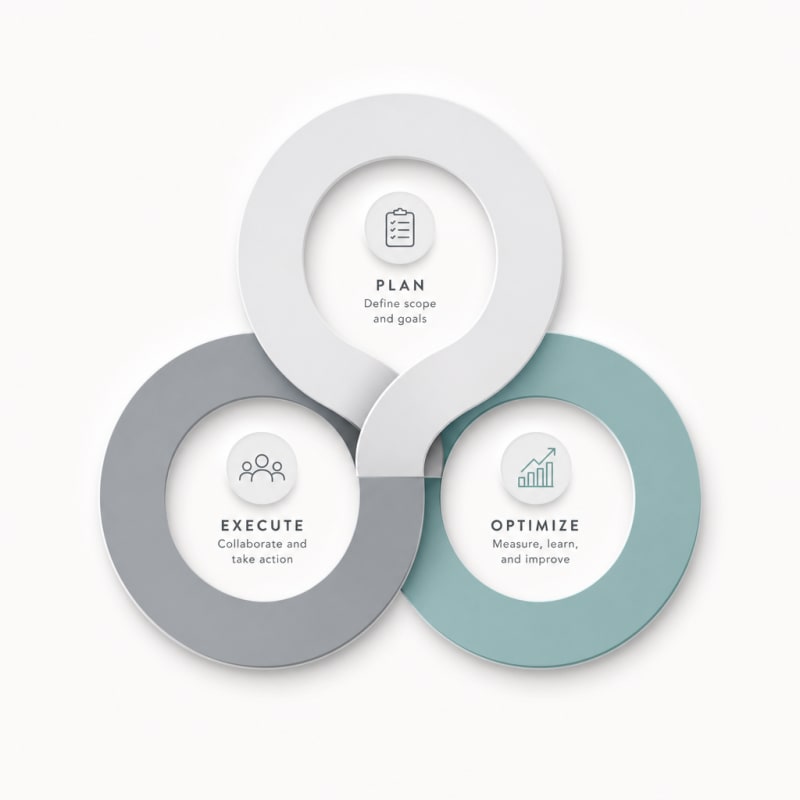
- Discovery and scoping
- Proposal and contract
- Onboarding and kickoff
- Active work and revisions
- Delivery and closeout
- Payment and follow-up
For each phase, identify which tasks repeat with every client. Those repeatable elements are your automation candidates. The unique, creative work that requires your expertise stays manual—that's where your value lives.
Automate Client Onboarding With Templates and Triggers
Client onboarding sets the tone for the entire relationship. A smooth start builds confidence; a chaotic one creates doubt about your professionalism.
Build a Welcome Sequence
Use email automation tools like Zapier, Make, or built-in features in your CRM to trigger a sequence when a contract is signed. This sequence should include:
- A welcome message that confirms next steps and timelines
- A questionnaire or intake form to gather essential information
- Access credentials to any shared workspaces or project management tools
- Links to your communication guidelines (response times, preferred channels, meeting policies)
The key is consistency. Every client receives the same high-quality introduction without you manually sending emails or remembering what to include.
Use AI to Personalize Templates
Generic templates feel robotic. AI writing tools can help you create personalized onboarding documents quickly. Feed your AI assistant basic client information—industry, project type, specific goals—and have it adapt your standard welcome message to feel tailored.
This takes seconds instead of the 10-15 minutes you'd spend manually customizing each message, and clients receive communication that feels thoughtful rather than mass-produced.
Centralize Communication and Project Context
Email chains are where information goes to die. Clients forward old messages, attach the wrong files, and reference conversations you can't easily search. Moving communication into a structured system protects both parties.
Create Client-Specific Workspaces
Tools like Notion, ClickUp, or Airtable let you build client portals where everything lives in one place: project briefs, timelines, deliverables, feedback, and files. Your client gets a single URL they can bookmark.
Set up templates for these workspaces so creating a new client portal takes minutes. Include sections for:
- Project overview and goals
- Timeline and milestones
- Asset repository (organized by type and version)
- Active tasks and their status
- Meeting notes archive
- FAQ specific to their project
Deploy AI-Powered Meeting Summaries
Stop taking manual notes in client calls. Tools like Otter.ai, Fathom, or Fireflies transcribe conversations and generate summaries automatically. These summaries get posted directly to the client workspace, creating a searchable record of decisions and action items.
This eliminates "wait, what did we agree on?" conversations and provides documentation if scope questions arise later.
Systematize Feedback and Revision Cycles
Vague feedback creates extra work. Clients say "make it pop" or "something feels off," leaving you to guess what they mean. Building structure around revisions improves outcomes and reduces rounds of changes.
Use Annotation and Approval Tools
Platforms like Markup.io, Filestage, or Loom let clients give feedback directly on deliverables with timestamps, annotations, or video walkthroughs. This specificity eliminates ambiguity.
Set up automated reminders if feedback isn't received by a certain date. Most tools can send escalating notifications, keeping projects moving without you chasing people.
Apply AI to Interpret Feedback
When you receive written feedback, especially from less experienced clients, use AI to help translate subjective comments into actionable changes. Copy their feedback into ChatGPT or Claude along with context about the project, and ask for interpretation and suggestions.
This helps you respond to the underlying concern rather than the surface-level comment, often resolving issues in fewer revision rounds.
Automate Administrative Tasks That Drain Your Day
The administrative overhead of contracting work—contracts, invoices, expense tracking, follow-ups—rarely requires your personal attention once systematized.
Implement Contract and Proposal Automation
Tools like PandaDoc, Proposify, or even DocuSign with templates let you generate contracts from a standard template by filling in variables. When a deal is marked "won" in your CRM, automatically generate and send the contract for signature.
Include payment terms, scope definitions, revision policies, and kill fees in every contract. Standardizing these terms across clients simplifies your contractor systems and reduces negotiation time.
Set Up Automated Invoicing
Configure your invoicing software (FreshBooks, QuickBooks, Wave) to generate and send invoices based on triggers: project milestones, monthly retainer dates, or time tracking thresholds. Add automated payment reminders for overdue invoices at 3, 7, and 14 days.
This removes the awkwardness of chasing payments and ensures you get paid promptly without dedicating mental energy to accounts receivable.
Track Time and Expenses Passively
Use automatic time tracking tools like Toggl Track or Clockify that run in the background based on which applications you use. For expenses, tools like Expensify photograph receipts and categorize spending automatically.
These passive systems capture billable hours and deductible expenses you'd otherwise forget, improving profitability without additional effort.
Create Knowledge Bases to Reduce Repetitive Questions
Every contractor answers the same questions repeatedly: "How do revisions work?" "When will I receive deliverables?" "What do you need from me?"
Build a simple knowledge base using Notion, a Google Doc, or a dedicated tool like HelpKit. Document your most common processes and policies, then link to relevant sections in your onboarding materials and project workspaces.
When clients ask questions covered in your documentation, you can respond warmly with "Great question! I've documented that here:" followed by the link. This trains clients to check documentation first while demonstrating your professionalism.
Use AI to Build Your Knowledge Base Quickly
Don't start from a blank page. Use AI to draft initial versions of your documentation. Provide prompts like:
"Write a client-facing explanation of my revision policy: Two rounds of revisions included, additional rounds billed at $X/hour, revisions must be submitted within Y days, all feedback consolidated in one document."
Edit the output to match your voice, but let AI handle the first draft. You can build a comprehensive knowledge base in an afternoon rather than avoiding it for months.
Build Repeatable Project Templates
Every time you start a project from scratch, you're wasting your past experience. Create templates for recurring project types that include all standard tasks, typical timelines, and common deliverables.
Your project management tool likely supports templates. When you win a new project of a familiar type, clone the template and adjust specifics rather than building from zero.
Include task dependencies so follow-up items automatically appear when prerequisites are completed. Add automated notifications for approaching deadlines. Build in buffer time for typical delays like slow client feedback.
Implement a Post-Project Follow-Up System
The project doesn't end at delivery. Automated follow-up keeps relationships warm and generates referrals and repeat business.
Set up a sequence that triggers when you mark a project complete:
- Day 0: Thank you message with final deliverables and instructions
- Day 3: Check-in asking if they have questions or need support
- Day 14: Request for testimonial or case study participation
- Day 30: Invitation to refer others or book future work
These touchpoints happen automatically, keeping you top-of-mind without manual follow-up tasks cluttering your calendar.
Monitor and Optimize Your Systems Over Time
Your first version of automated client operations won't be perfect. That's fine. The goal is progress, not perfection.
Review your systems quarterly and ask:
- Which manual tasks am I still doing repeatedly?
- Where do clients seem confused or ask for clarification?
- Which automations are working well, and which feel clunky?
- What's taking longer than it should?
Make incremental improvements based on real friction points. Your freelance workflow should evolve as you learn what works for your specific service delivery process.
Start Small and Build Systematically
Don't try to automate everything at once. That path leads to overwhelm and abandoned half-built systems. Instead, pick one pain point—maybe client onboarding or invoice generation—and solve it completely before moving to the next.
Each
The Practical Solution
Start by mapping every repeated step in your client journey, from contract signing to final invoice. Then automate the predictable parts—onboarding emails, intake forms, file requests—using tools like Zapier or Make connected to your existing systems. Use AI to personalize standard templates so they don't feel robotic, and move all project communication into one shared workspace instead of email threads. The goal isn't to automate everything, but to eliminate the repetitive admistrative task.
— Kevin Marsh, Editor-in-Chief
Synthetic Proof
Verified — Editorial Layer
This content has passed editorial verification for clarity, accuracy, and trust alignment.
Editor-in-Chief: Kevin Marsh
Verification Status: PASSED
Verification Status: PASSED
Comments
Post a Comment